Use Fast Bundle with preorders
How Fast Bundle behaves with STOQ preorders, and which bundle type to choose for each setup.
Last updated
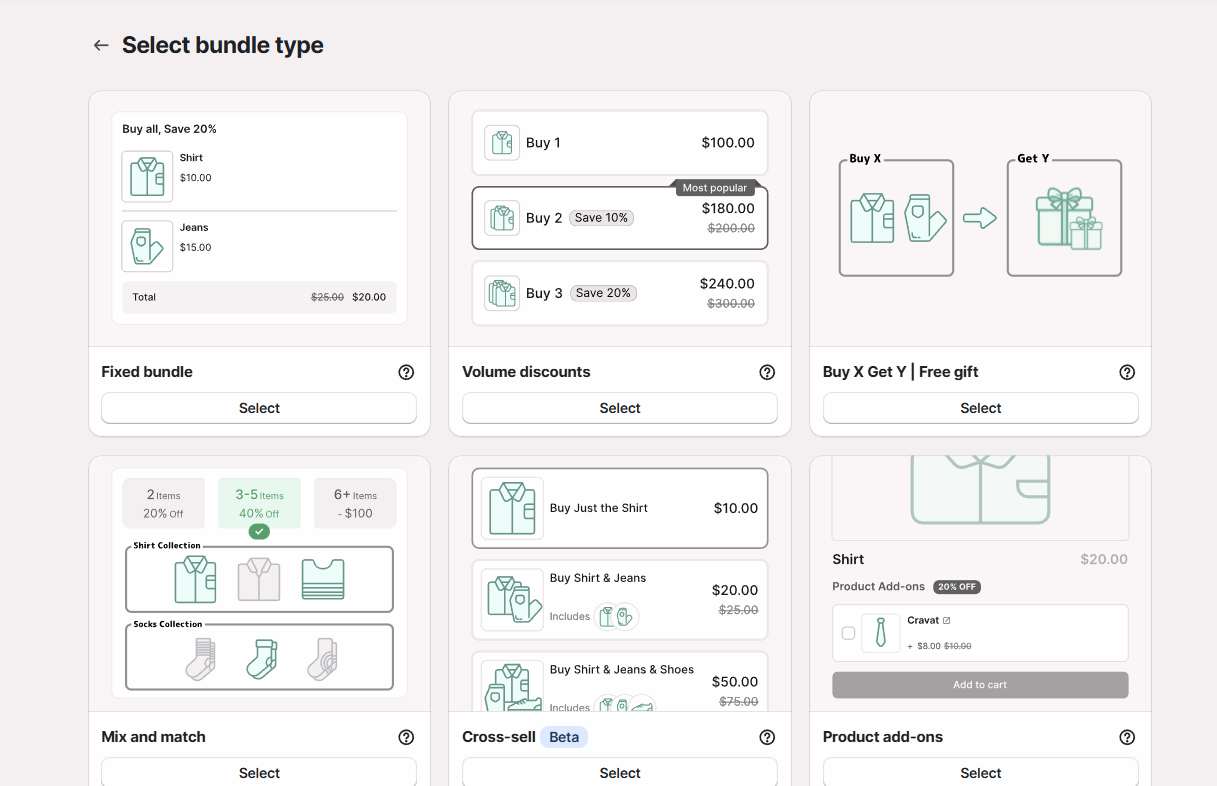
This article explains how Fast Bundle behaves with STOQ preorders. Fast Bundle and STOQ work together in the compatible setups described below. However, this is an app compatibility setup, not a direct integration between the two apps. Fast Bundle does not automatically inherit every STOQ preorder setting across all bundle types and presentation modes.
The best setup depends on what kind of bundle you are creating. Use this guide to choose the right bundle type and understand which STOQ preorder features work with each setup.
Bundle types
Section titled “Bundle types”| Fast Bundle setup | STOQ result | Recommendation |
|---|---|---|
| Fixed Bundle (Separate line items) | STOQ preorder details, line item properties, separate fulfillment statuses, and fulfillment hold worked. Partial payments worked, but the deposit was calculated before the Fast Bundle discount. | Recommended |
| Fixed Bundle (Single product) | Basic STOQ preorder details appeared, but partial payments, STOQ preorder discounts, and fulfillment hold did not work. Disabling selling plans allowed the STOQ-preorder order tag to appear, but did not restore the other features. | Not recommended |
| Volume discounts | STOQ preorder details, line item properties, Fast Bundle discounts, and fulfillment hold worked. Partial payments used the preorder price before the Fast Bundle volume discount. | Recommended |
| Buy X Get Y / Free gift | Worked when the preorder product was free and when the in-stock product was free. Pricing and fulfillment behavior worked correctly in the tested orders. | Recommended |
Fixed Bundle (Separate line items)
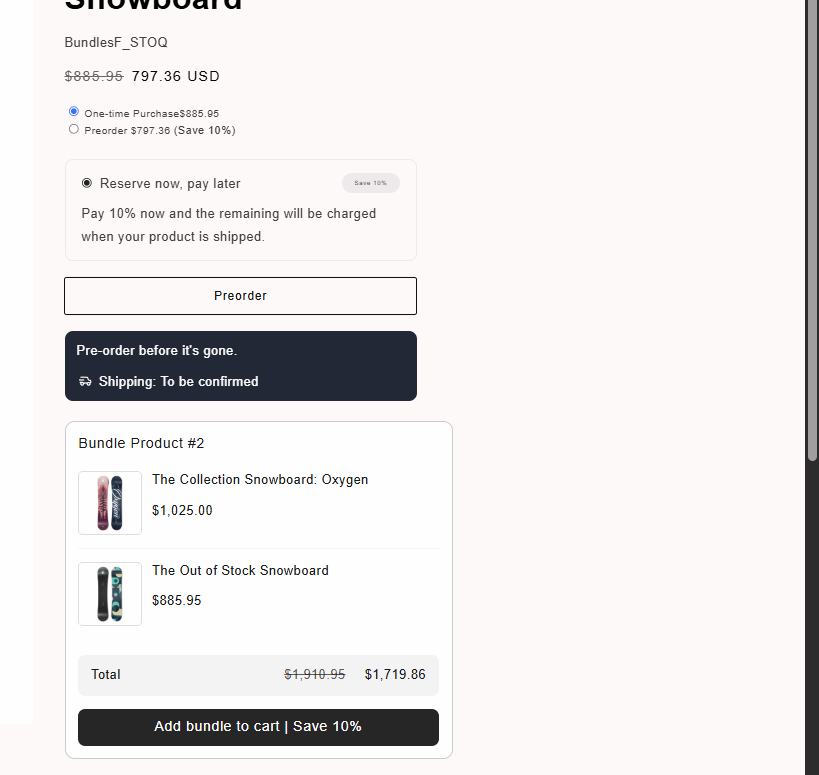
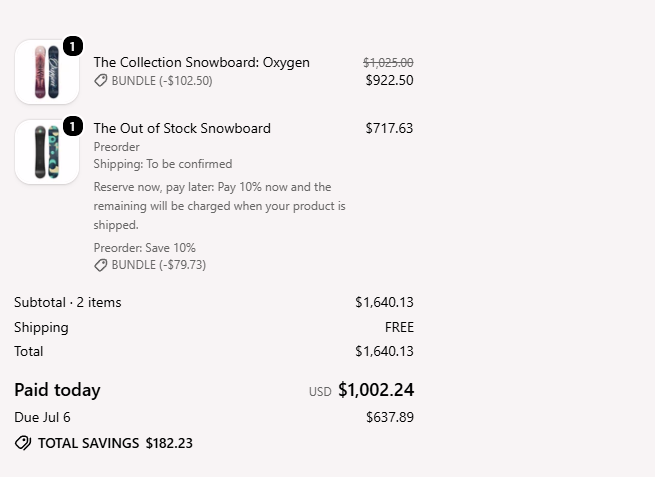
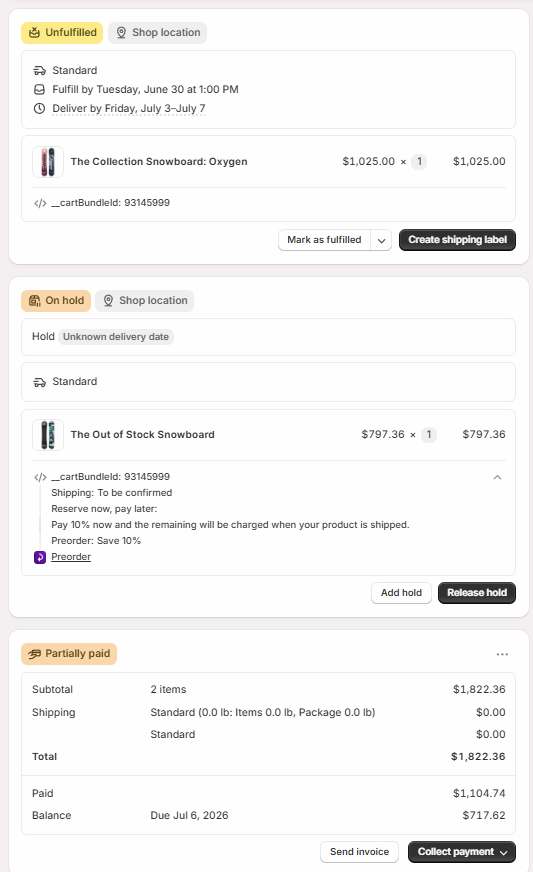
Section titled “Fixed Bundle (Separate line items)”Fast Bundle creates a Shopify bundle product with its own product page. In the tested mixed bundle, one component was in stock and the other was a STOQ preorder product. With this setup STOQ was able to:
- Identify the preorder product
- Preserve its preorder details and line item properties
- Place the preorder product on fulfillment hold
- Leave the in-stock product Unfulfilled and ready for normal fulfillment
Partial payments
Section titled “Partial payments”Partial payments worked with Separate line items, but the deposit was calculated before the Fast Bundle discount was applied to the preorder product. The final order total included the Fast Bundle discount. However, the amount charged at checkout was based on the STOQ preorder price before the Fast Bundle discount.
Recommendation
Section titled “Recommendation”Use Separate line items when a Fixed Bundle contains STOQ preorder products. Before launch:
- Test the generated bundle product page for delayed preorder recognition
- Confirm the amount due at checkout
- Confirm that the preorder and in-stock products receive the expected fulfillment statuses
Fixed Bundle (Single product)
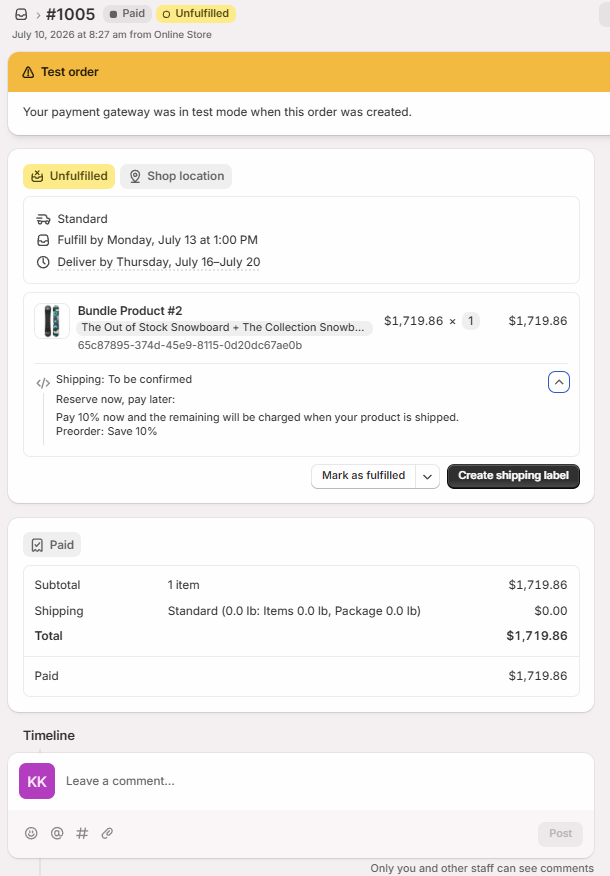
Section titled “Fixed Bundle (Single product)”The Single product presentation combines the entire bundle into one Shopify line item. STOQ preorder details can appear on the product page, at checkout, and on the Shopify order. However, the underlying STOQ functionality does not apply correctly.
Partial payments do not work. The checkout displayed STOQ’s Reserve now, pay later details, but the full bundle amount will be charged.
Preorder discounts do not work. The STOQ preorder discount did not reduce the bundle price. Although preorder discount details will appear if configured, the discount was not applied to the order total.
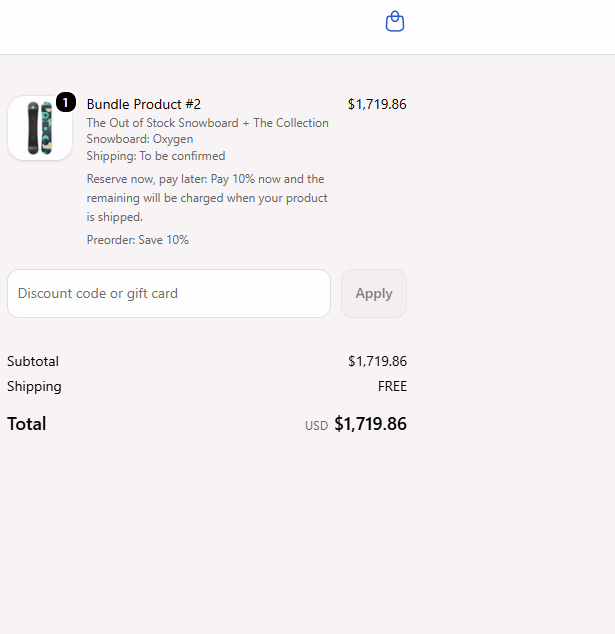
Fulfillment hold does not work. The bundle remained one Unfulfilled Shopify line item. STOQ could not place only the preorder component on hold.
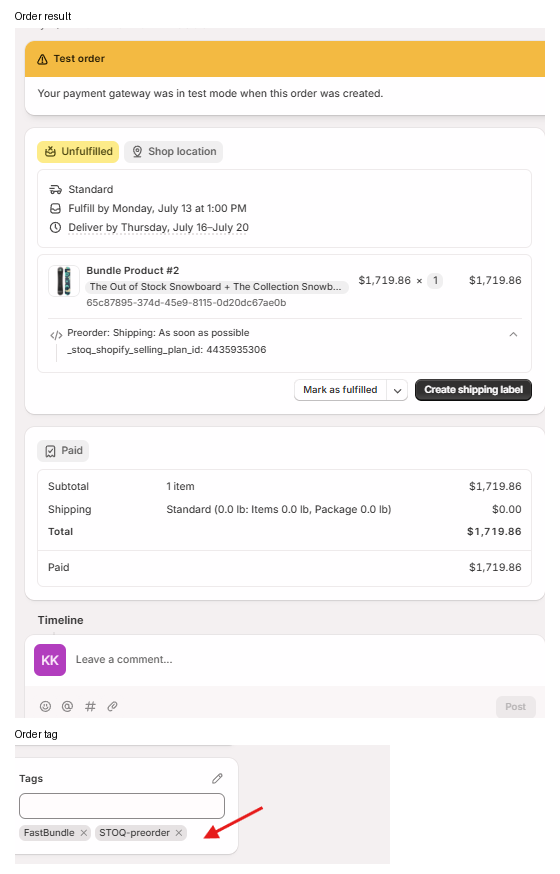
Selling plans disabled
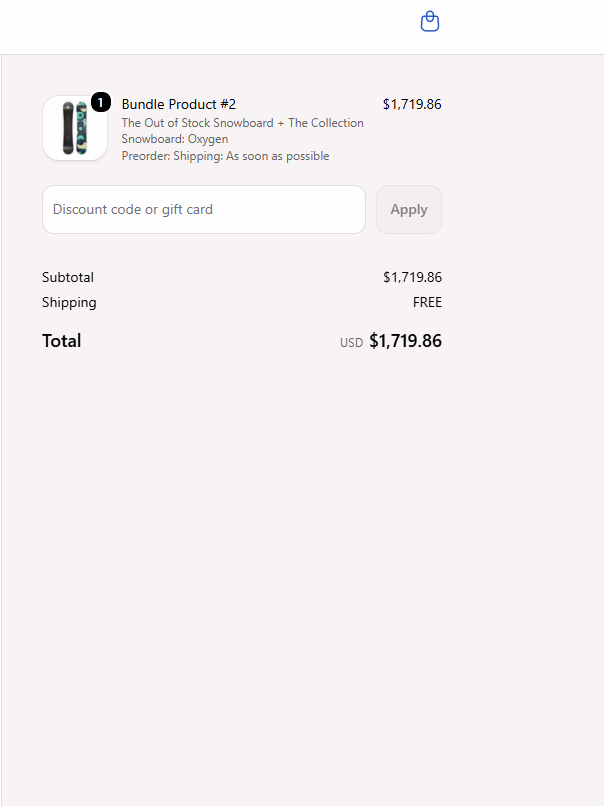
Section titled “Selling plans disabled”Disabling selling plans allowed the STOQ-preorder order tag to appear in the tested order. However, disabling selling plans did not fix the other limitations:
- The full bundle amount was still charged
- Partial payments did not work
- The STOQ preorder discount did not apply
- Fulfillment hold did not work
This should be treated as a tagging-only workaround, not full STOQ compatibility.
Two preorder products
Section titled “Two preorder products”Using two preorder products inside the Single product bundle would not improve compatibility. Partial payments, STOQ preorder discounts, and fulfillment hold will still not work with this setup. Adding the generated bundle product and both component products to the STOQ preorder offer, the order still charged the full amount, remained Unfulfilled, and did not apply the STOQ preorder discount.
Recommendation
Section titled “Recommendation”Do not use the Single product presentation when you need:
- STOQ partial payments
- STOQ preorder discounts
- STOQ fulfillment hold
- Separate fulfillment statuses for preorder and in-stock products
Volume Discounts
Section titled “Volume Discounts”Fast Bundle volume discounts work with STOQ preorders. The bundle discount applies successfully, and all standard STOQ preorder functionality remains available, including the preorder purchase option, preorder button, shipping details, line item properties, and fulfillment hold. Orders are correctly placed On hold.
Partial-payment limitation
Section titled “Partial-payment limitation”The same limitation applies here as well. When partial payments are enabled, the deposit is calculated using the preorder price before the Fast Bundle discount is applied, rather than the final discounted price. As a result, the charged deposit is higher than the expected percentage of the customer’s final payable total.
Recommendation
Section titled “Recommendation”Volume discounts are recommended with STOQ, but check the deposit and remaining balance whenever a Fast Bundle discount applies to the preorder product.
Buy X Get Y / Free gift
Section titled “Buy X Get Y / Free gift”Fast Bundle Buy X Get Y / Free gift promotions work correctly with STOQ preorders in both tested scenarios.
When customers buy an in-stock product and receive a preorder product for free, the preorder product is discounted to $0.00 while retaining its STOQ preorder details. The in-stock product remains Unfulfilled, the free preorder product is placed On hold, and the free-item discount is applied correctly.
When customers buy a preorder product and receive an in-stock product for free, the free-item discount applies to the in-stock product. The preorder product remains the paid item, and checkout correctly collects the configured preorder deposit.
Recommendation
Section titled “Recommendation”Buy X Get Y / Free gift promotions are compatible with STOQ preorders for the tested free-item scenarios. If a promotion applies a Fast Bundle discount directly to the paid preorder product, verify the partial-payment calculation separately.
Troubleshooting
Section titled “Troubleshooting”Preorder details do not appear immediately after adding a Fixed Bundle
Test the complete customer journey. Fast Bundle’s generated product page may delay STOQ preorder recognition.
Partial-payment amount is higher than expected
Compare the charged deposit with the preorder price before the Fast Bundle discount. Deposits may be calculated before the bundle discount is applied.
Checkout shows "Reserve now, pay later" but charges the full amount
Check whether the Fixed Bundle uses Single product. Switch to Separate line items to enable STOQ partial payments.
Preorder item is not placed On hold
Verify that STOQ fulfillment is set to On hold and that the preorder product remains a separate Shopify line item. Single product does not support fulfillment hold.
STOQ preorder discount does not apply
Check whether the Fixed Bundle uses Single product. STOQ preorder discounts are not supported in this presentation.
STOQ preorder tag is missing
If using Single product, disabling selling plans may restore the preorder tag, but partial payments, preorder discounts, and fulfillment hold remain unsupported.
Can I use Fast Bundle Fixed Bundles with STOQ preorders?
Yes. Use the Separate line items presentation. This allows STOQ to identify the preorder product and apply its fulfillment settings. Partial payments have the pre-Fast-Bundle-discount calculation limitation.
Can I use the Single product presentation with STOQ?
It is not recommended when you need STOQ partial payments, preorder discounts, or fulfillment hold. Basic preorder details may appear, but Shopify processes the bundle as one fully paid, Unfulfilled line item.
Do STOQ partial payments work with Fast Bundle?
They work with Fixed Bundle (Separate line items) and Volume discounts. However, the deposit is calculated from the preorder price before the Fast Bundle discount. Partial payments do not work with Single product.
Do STOQ fulfillment holds work with Fast Bundle?
Yes, when the preorder product remains a separate Shopify line item. Fulfillment hold works with Separate line items, Volume discounts, and the tested Buy X Get Y scenarios. It does not work with Single product.
Do STOQ preorder discounts work with Fast Bundle?
They work in the tested Separate line items and Volume discount flows. They do not work with Single product.
Does disabling selling plans fix Single product?
No. It allows the STOQ-preorder order tag to appear in the tested setup, but partial payments, preorder discounts, and fulfillment hold still do not work.
What Fast Bundle setup is recommended?
Use Fixed Bundle with Separate line items when a bundle contains STOQ preorder products.
Is this a direct integration between Fast Bundle and STOQ?
No. This article is based on compatibility testing between the two apps.
Related guides
Section titled “Related guides”Thanks for letting us know.
Still stuck? Ask Quinn or chat with support