
Fix "Variant can only be purchased with a selling plan"
Use this guide if a customer sees "Variant can only be purchased with a selling plan" when adding a product to cart, on a variant that isn't sold out and looks correctly set up. This is a Shopify error, not a STOQ one, it usually appears on a product that was part of a preorder offer before and still carries a leftover Shopify setting from that.
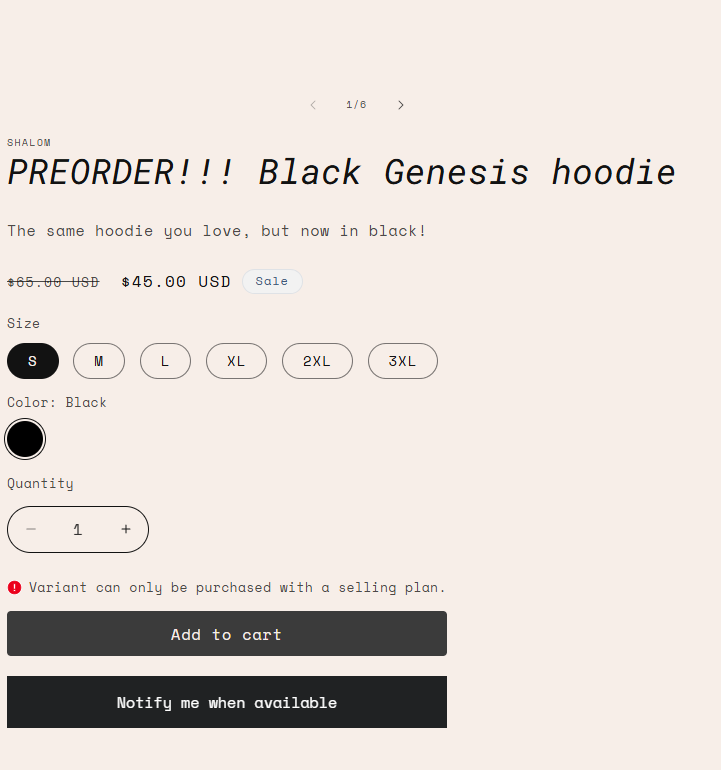
Why this happens
Every Shopify variant has a Purchase options setting called "Only sell this product with these purchase options." When it's turned on, Shopify locks that variant to selling-plan-only purchases, any add-to-cart attempt without a valid selling plan attached is rejected at the Shopify level, before STOQ's own logic runs.
While a variant is in an active STOQ preorder offer running in Use Shopify purchase option mode, this checkbox is typically on. The problem: Shopify doesn't automatically turn it back off when the offer ends, the offer is disabled, or the variant is removed from the offer. The variant is left locked to selling-plan-only purchase with no active plan to attach, so normal customers checking out hit this error.
Check your setup
Open the product in Shopify admin
Go to Shopify Admin → Products, search for and open the affected product.
Scroll to Purchase options
Find the Purchase options section further down the product page.
Turn off the selling-plan-only restriction
If the checkbox restricting the product to selling-plan-only purchase is enabled, turn it off.
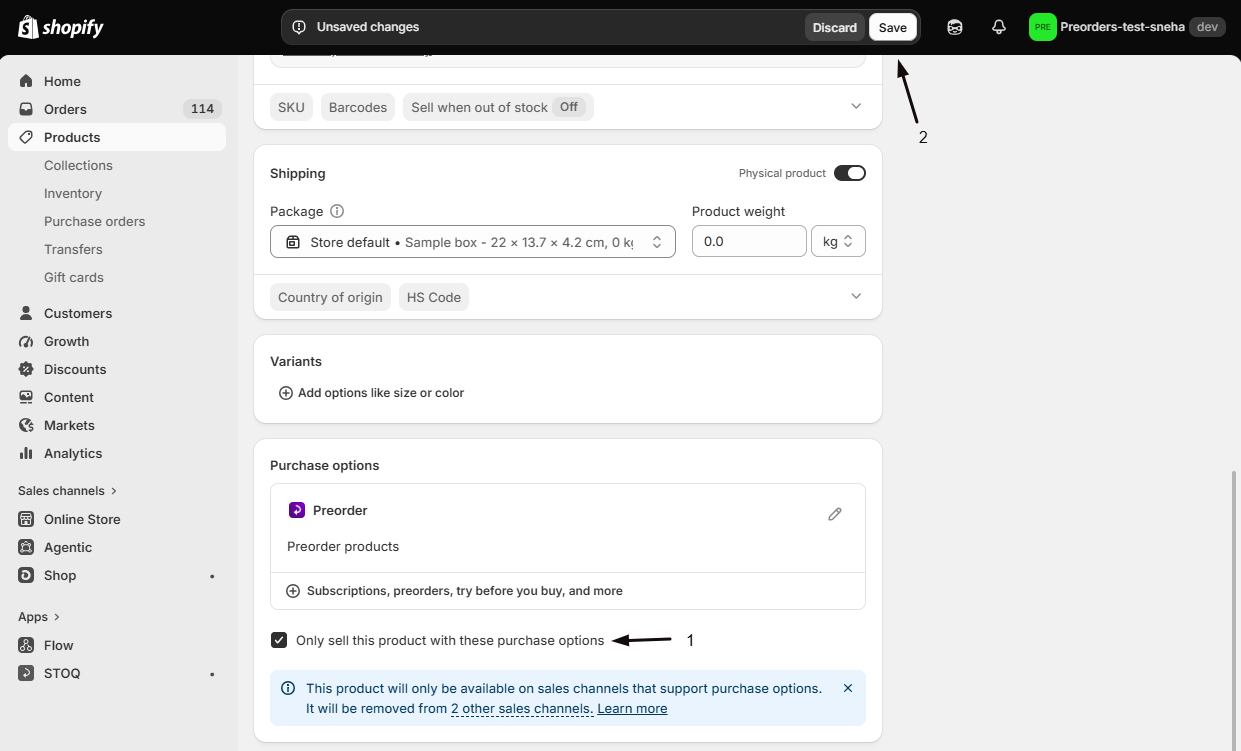
Save
Save the product. The variant can now be added to cart normally without a selling plan.
This setting lives on the variant, not the offer. If more than one variant of the product was in the old preorder offer, check each one, Shopify tracks this per variant.
Troubleshooting
The checkbox is already off, but the error still shows
Two other things can produce the same Shopify error:
- The product still has an active Shopify selling plan group attached from STOQ (check Preorders → Offers to confirm the offer is actually disabled, not just paused for that variant).
- A cached storefront page. Hard refresh or test in an incognito window, Shopify's Liquid cache can serve a stale add-to-cart form for up to a few hours after a settings change.
I want to keep the variant on a selling plan, just not require it
"Only sell this product with these purchase options" is an all-or-nothing lock. If you still want this variant to support a selling plan (for example, a subscription) but also allow normal one-time purchase, turn the checkbox off, Shopify will then offer the selling plan as optional rather than mandatory.
This is happening across many products at once
If you ran a large preorder offer and disabled it in bulk, several variants can be left with this checkbox still on. There's no bulk toggle for it in Shopify admin, each variant needs to be checked individually. If this is affecting a large catalog, contact support with a list of affected product URLs.
FAQ
Does STOQ set this checkbox?
No. STOQ never sets or reads Shopify's "Only sell this product with these purchase options" flag. It's set entirely within Shopify admin, either by a merchant directly, or as a side effect of how Shopify's own selling-plan UI behaves while a purchase option is active on the variant.
Will turning this off affect the old preorder orders?
No. It only affects new add-to-cart attempts going forward. Orders already placed keep whatever terms they were created with.
How do I avoid this happening again on future offers?
When you disable a preorder offer or remove a variant from one, check the variant's Purchase options in Shopify admin if you don't intend to keep it on a selling plan. This is a Shopify-side cleanup step STOQ can't do for you.
Related guides
Advanced settings
STOQ's own Purchase option setting (Use Shopify purchase option vs. Use without purchase option), a different, offer-level setting from Shopify's variant-level one covered here.
Fix Preorder button display problems
For when the Preorder button itself isn't showing, rather than Add to cart failing after it shows correctly.
Turn preorder offers on or off
How disabling an offer affects STOQ-managed products.
Preorders in Shopify admin
What STOQ sets on a preorder order vs. what Shopify controls.
