Use Adoric Bundles with preorders
How Adoric Bundles behaves with STOQ preorders, and which bundle type to choose for each setup.
Last updated
This article helps you understand how Adoric Bundles behaves with STOQ preorders. Adoric Bundles is listed as compatible with STOQ, but this is a compatibility setup, not a direct integration between the two apps. That means STOQ does not manage the bundle inside Adoric, and Adoric does not automatically inherit every STOQ preorder setting in every bundle type.
The best setup depends on what kind of bundle you are creating. Use this guide to choose the right Adoric bundle type and understand which STOQ preorder features work with each setup.
Bundle types
Section titled “Bundle types”| Adoric bundle type | STOQ result | Recommendation |
|---|---|---|
| Quantity Breaks | Works with STOQ preorders. Full payment works correctly. Partial payments work, but if an Adoric discount is used, the deposit and remaining payment may be calculated from the pre-Adoric-discount price. | Recommended |
| Product Bundles | Works with STOQ preorders. Full payment works correctly. Partial payments work, but if an Adoric discount is used, the deposit and remaining payment may be calculated from the pre-Adoric-discount price. | Recommended |
| Mix & Match | Works with STOQ preorders. Partial payments, preorder discounts, and fulfillment setup work. Partial payments may be calculated from the pre-Adoric-discount price. | Recommended |
| Buy X Get Y | Works with STOQ preorders. Partial payments, preorder discounts, and fulfillment setup work. If the Adoric discount is applied to the preorder product, partial payments may be calculated from the pre-Adoric-discount price. | Recommended |
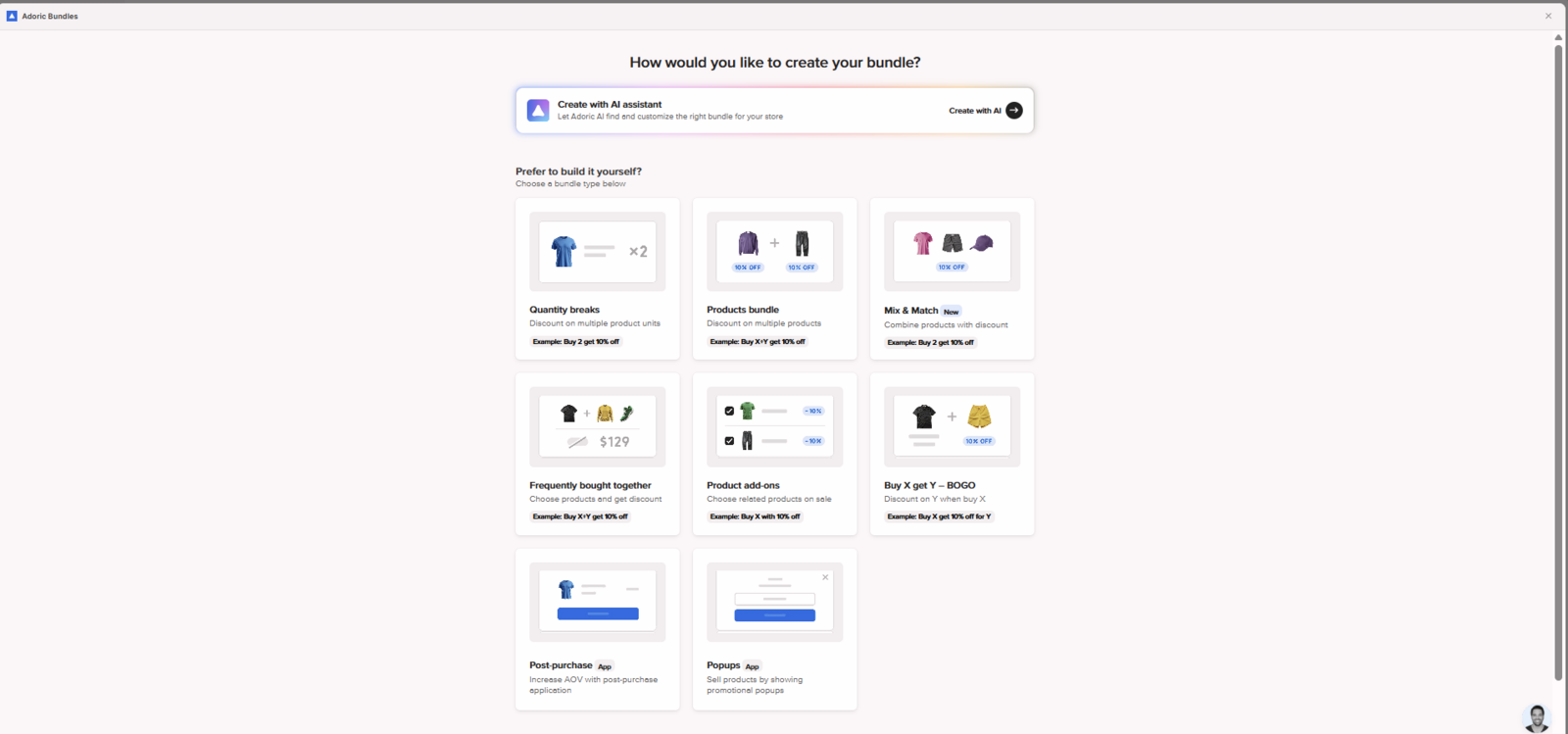
Quantity Breaks
Section titled “Quantity Breaks”Adoric Quantity Breaks work with STOQ preorders. STOQ purchase options appear on the preorder product, and STOQ line item properties also show on the Shopify order.
Quantity Breaks worked correctly with:
- Multiple quantities of the same preorder product
- Multiple preorder products
- Mixed orders containing preorder and in-stock products
- Fixed bundles inside Quantity Breaks
- Buy a product and get a free gift offers inside Quantity Breaks
The preorder product keeps its preorder details at checkout and in the Shopify order, including shipping details, payment terms, preorder discounts, and fulfillment setups.
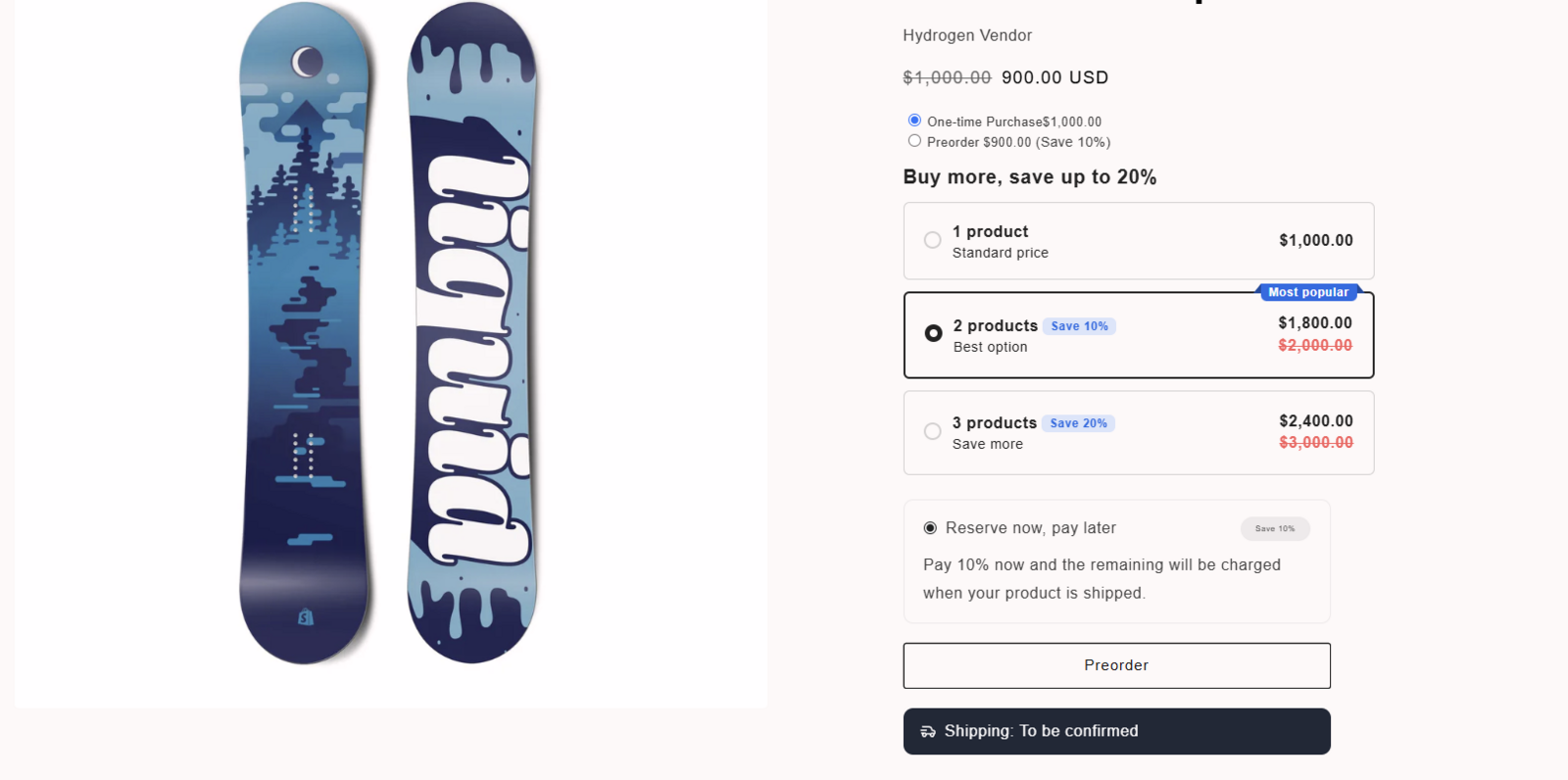
Quantity Breaks with partial payments
Section titled “Quantity Breaks with partial payments”In this setup, the preorder product shows the correct preorder details. However, the partial payment amount may not be based on the final discounted price. If Adoric applies a Quantity Break discount to the preorder product, STOQ may still calculate the deposit and remaining payment using the preorder product price before the Adoric discount is applied.
This means the checkout total can look correct, but the split between “due today” and “due later” may not match the final discounted preorder price.
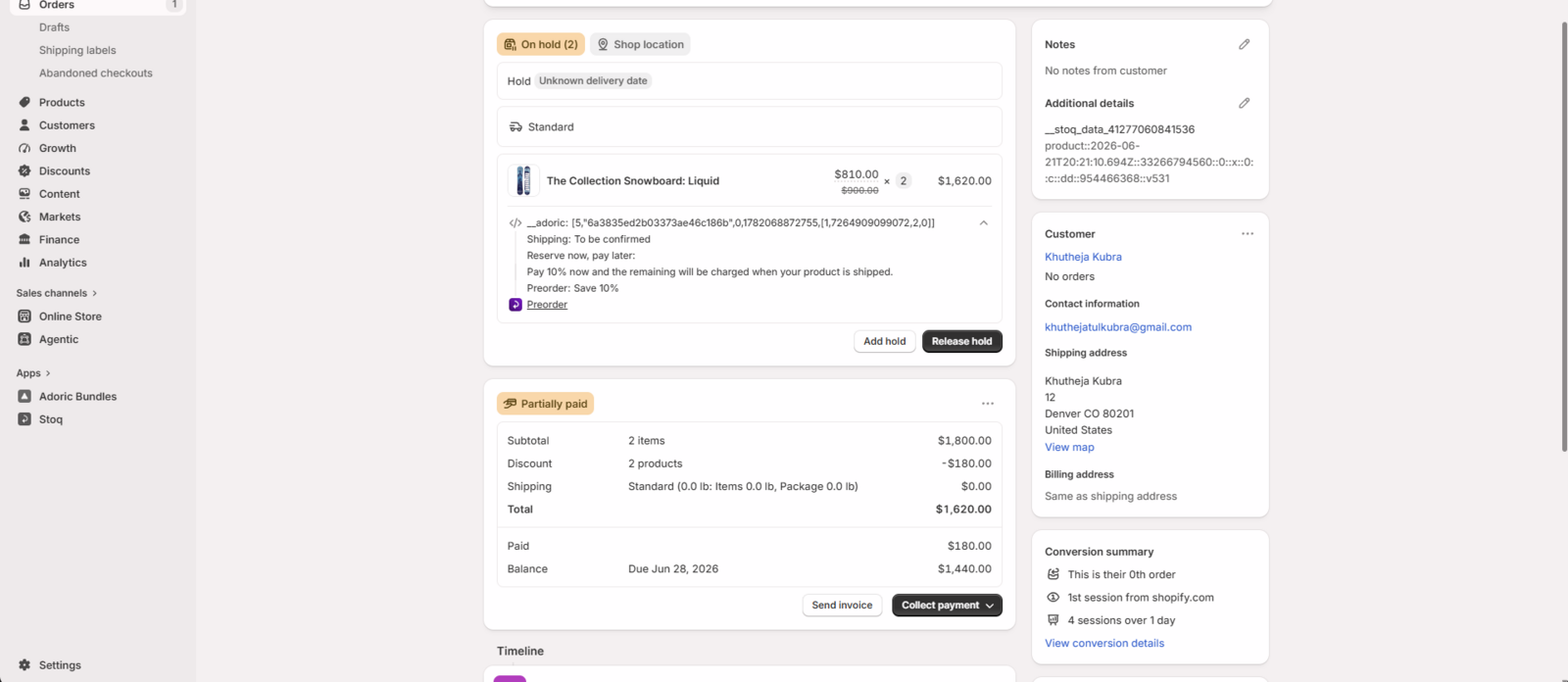
Quantity Breaks with full payment
Section titled “Quantity Breaks with full payment”Full payment worked correctly with Adoric discounts and STOQ preorder discounts.
Shopify order result
Section titled “Shopify order result”For Quantity Breaks, STOQ fulfillment hold works without any issues. Preorder products appeared on hold, while in-stock products remained available for normal fulfillment.
Product Bundles
Section titled “Product Bundles”Adoric Product Bundles work with STOQ preorders.
Product Bundles tested:
- Classic Bundles
- Buy X Get Y
- Buy X Get a Gift
With this setup, the in-stock product and preorder product are added to checkout as separate products. The preorder product shows the correct preorder details at checkout, and preorder details appear in the Shopify order. This setup works for mixed bundles that include:
- One in-stock product
- One preorder product
The preorder product can show details such as shipping information, payment terms, preorder discounts, and fulfillment hold.
Product Bundles with partial payments
Section titled “Product Bundles with partial payments”In this setup, the preorder product shows the correct preorder details. However, the partial payment amount may not be based on the final discounted price. If Adoric applies a bundle discount to the preorder product, STOQ may still calculate the deposit and remaining payment using the preorder product price before the Adoric discount is applied. This means the checkout total can look correct, but the split between “due today” and “due later” may not match the final discounted preorder price.
Product Bundles with full payment
Section titled “Product Bundles with full payment”Full payment worked correctly with Adoric bundle discounts and STOQ preorder discounts.
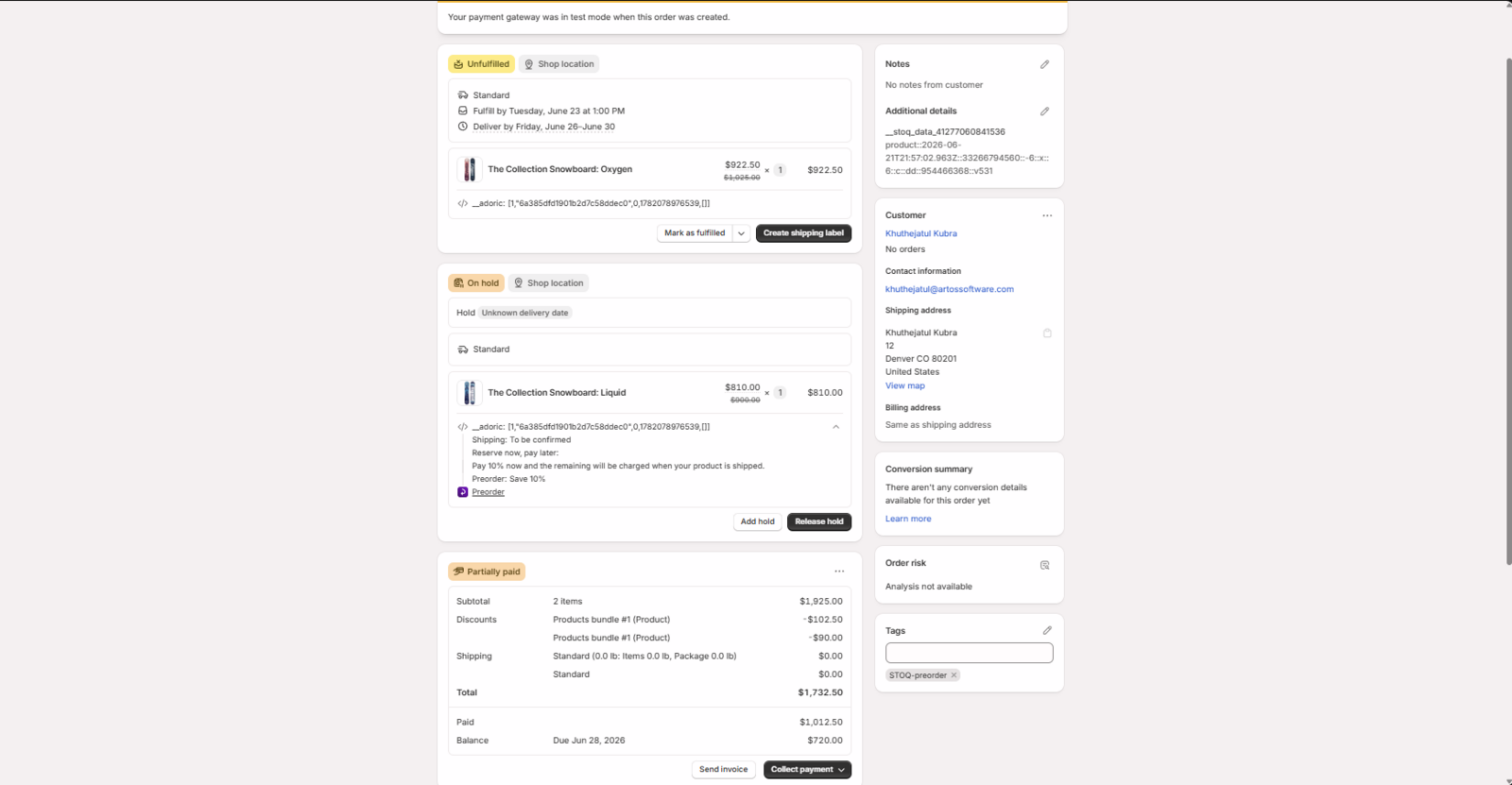
Mix & Match
Section titled “Mix & Match”Adoric Mix & Match works with STOQ preorders.
Use this bundle type when you want customers to choose multiple products and receive a discount. With Mix & Match, preorder products keep their preorder details at checkout, the discount applies correctly, and STOQ preorder settings continue to work.
Mix & Match with partial payments
Section titled “Mix & Match with partial payments”Mix & Match has the same limitation as Quantity Breaks and Product Bundles when Adoric discounts are applied to preorder products. If Adoric applies a Mix & Match discount to a preorder product, STOQ may still calculate the deposit and remaining payment using the preorder product price before the Adoric discount is applied.
Buy X Get Y
Section titled “Buy X Get Y”Buy X Get Y offers created using Adoric work with STOQ preorders. Use this bundle type when you want customers to buy a preorder product and receive another product for free or at a discount. With this setup, the free or discounted product is added correctly, and the preorder product keeps its preorder details. This means customers can preorder one product and receive another product as part of the Buy X Get Y offer, while the preorder product still keeps its preorder payment details.
Buy X Get Y with free item
Section titled “Buy X Get Y with free item”When the discount applies only to the free item and not the preorder product, STOQ partial payments calculate correctly.
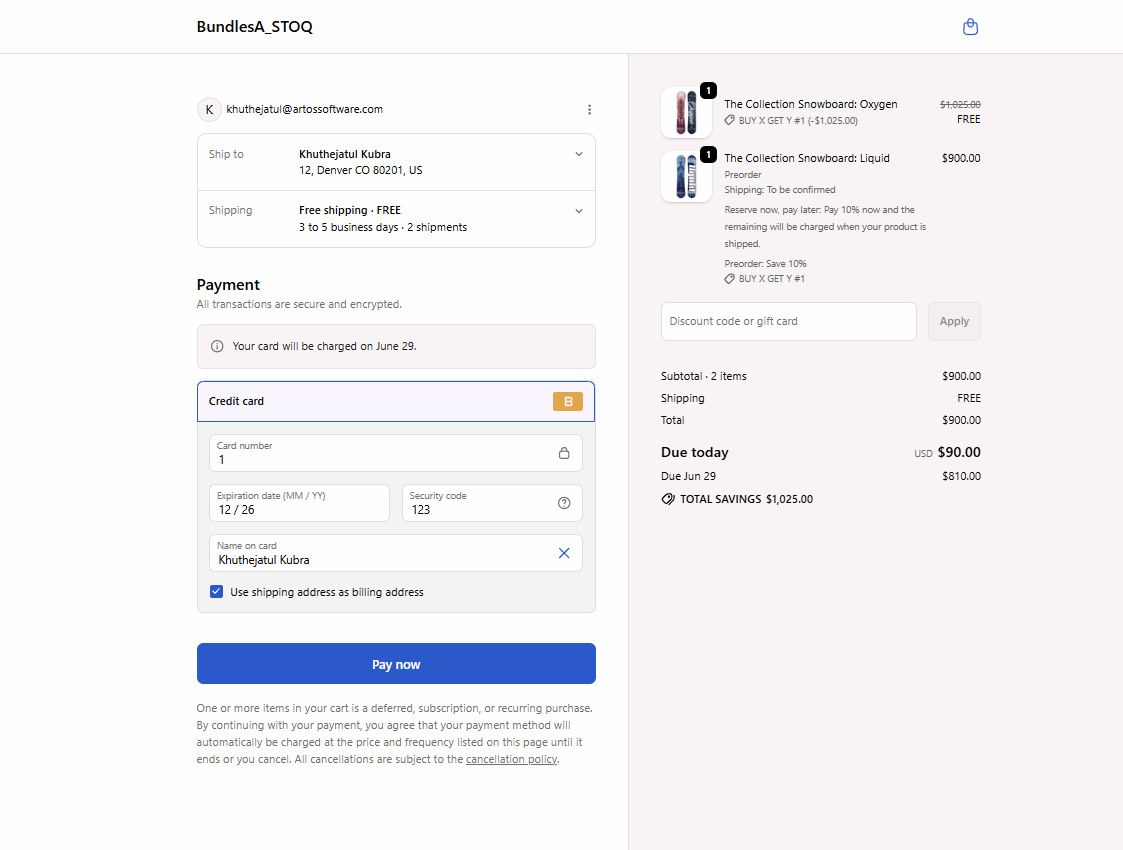
Buy X Get Y with discount on preorder product
Section titled “Buy X Get Y with discount on preorder product”If the discount is applied to the preorder product, STOQ would calculate the deposit and remaining payment using the preorder product price before the Adoric discount is applied. This means the checkout total can look correct, but the split between “due today” and “due later” may not match the final discounted preorder price.
Recommended use
Section titled “Recommended use”Use Quantity Breaks, Product Bundles, Mix & Match, and Buy X Get Y when selling preorder products with STOQ. Most of the Adoric bundle types worked correctly with STOQ preorders. The only limitation is how STOQ partial payment calculations interact with discounted preorder products.
Troubleshooting
Section titled “Troubleshooting”Partial payment amount looks wrong
Adoric discounts may affect how the deposit and remaining payment are calculated.
Preorder item is not placed on hold
Check if the product is included in a STOQ preorder offer and verify the fulfillment setting.
Preorder discount does not apply
Verify the preorder product is included in the STOQ offer.
Due today amount looks higher than expected
Check whether Adoric discounts are applied to the preorder product.
Can I use STOQ partial payments with Adoric Bundles?
Yes. Partial payments work with Quantity Breaks, Product Bundles, Mix & Match, and Buy X Get Y. However, if Adoric discounts are applied to the preorder product, the deposit and remaining payment would be calculated before the Adoric discount is applied.
What payment option is safest when using Adoric discounts?
Full payment.
Does STOQ fulfillment hold work with Adoric Bundles?
Yes. STOQ fulfillment hold worked correctly in all tested Adoric bundle types.
Do preorder details appear on the Shopify order?
Yes. STOQ line item properties and preorder details appeared correctly on Shopify orders during testing.
Are Adoric Bundle discounts applied correctly?
Yes. The Adoric discounts were applied correctly. The only limitation observed was how STOQ partial payment calculations interact with discounted preorder products.
Related guides
Section titled “Related guides”Thanks for letting us know.
Still stuck? Ask Quinn or chat with support