Fix double shipping charges
Stop mixed preorder and in-stock orders from being charged shipping twice at checkout.
Last updated
Use this guide if customers are being charged shipping twice on one order, once for the in-stock item, once for the preorder item. This isn’t a STOQ bug or a duplicate charge: it’s Shopify’s native split shipping feature grouping the two items into separate shipments at checkout, each with its own rate. By the end, a mixed order will show one shipment and one shipping charge at checkout.
Before you begin
Section titled “Before you begin”Shopify’s checkout splits one order into multiple shipments when the items in the cart don’t all belong to the same group. Shopify groups items into shipments by:
- Shipping profile: which shipping profile a product belongs to (Settings → Shipping and delivery).
- Location group: which location(s) can fulfill the item.
- Fulfillment timing: whether items are fulfillable now versus held or scheduled for later.
| Requirement | Detail |
|---|---|
| Shopify admin access | The fix is applied in Settings → Shipping and delivery, not inside STOQ |
| Know your fulfillment status | Check the preorder offer’s fulfillment status in the offer editor (Preorders in the left menu → Offers tab → open your offer → Customize → Shipping in the sidebar → Fulfillment status); this affects whether checkout treats the preorder item as shipping “now” or “later” |
| At least one other shipping profile or location | The option to turn off split shipping only appears in Shopify settings once you have two or more shipping profiles or locations |
Choose your setup
Section titled “Choose your setup”- Combine into one shipment (default goal): put the preorder and in-stock products in the same shipping profile, and set the preorder’s fulfillment status to Unfulfilled so it’s treated as fulfillable now, same as the in-stock item. Use this when you always want one combined shipping charge on mixed orders.
- Keep the preorder On hold or Scheduled: if you need that fulfillment status for how you manage preorders, accept that checkout may still split the shipment by timing, even with a matching shipping profile. See Choose a fulfillment setup for the tradeoffs of each status.
- Turn off split shipping in checkout (store-wide): removes split shipping for every order in the store, not just preorders. Use this if you never want checkout to show more than one shipment.
- Charge separate shipping on purpose: if you want customers to pay different shipping for preorder items, keep split shipping on and give preorder products their own shipping profile with its own rates. This is the intended way to charge separately, rather than accidentally doubling the charge.
What customers will see
Section titled “What customers will see”- Split shipping on and items grouped differently: checkout shows multiple shipments, each with its own shipping method selector, estimated delivery, rate, and item count. The customer can pick a different shipping speed per shipment and is charged for each separately. For example, a customer buying an in-stock T-shirt and a preorder hoodie on different shipping profiles might see standard shipping on the T-shirt ($5) and express on the hoodie ($20), for $25 total instead of one combined rate.
- Split shipping off, or items grouped the same way: checkout shows one shipment with one shipping rate and one charge, as normal.
- Accelerated checkouts (Shop Pay, Apple Pay, Google Pay) and local delivery don’t show split shipping at all: these paths always use a single combined rate regardless of your shipping profile setup.
Set it up
Section titled “Set it up”-
Identify the cause
Open the order in Shopify admin and check whether the preorder and in-stock items differ in any of these ways. Any of the three can cause a split.
- Shipping profile: are the two items on different shipping profiles?
- Location: are the two items assigned to different locations?
- Fulfillment timing: is one item Unfulfilled and the other On hold or Scheduled?
-
Put preorder and in-stock products in the same shipping profile
In Shopify admin, go to Settings → Shipping and delivery. Make sure the preorder product and the in-stock product are assigned to the same shipping profile (or merge a custom preorder profile back into your default one if you created one you no longer want).
-
Match fulfillment timing, or accept the timing-based split
If you chose to combine shipments in Choose your setup above, set the preorder’s fulfillment status to Unfulfilled in the offer editor’s Shipping section. If you’d rather keep it On hold or Scheduled, accept that Shopify may still split the shipment by timing.
-
Turn off split shipping in checkout (optional, store-wide)
- Go to Settings → Shipping and delivery.
- Below your shipping profile list, click split shipping (or Manage).
- Uncheck Show split shipping in checkout and click Save.
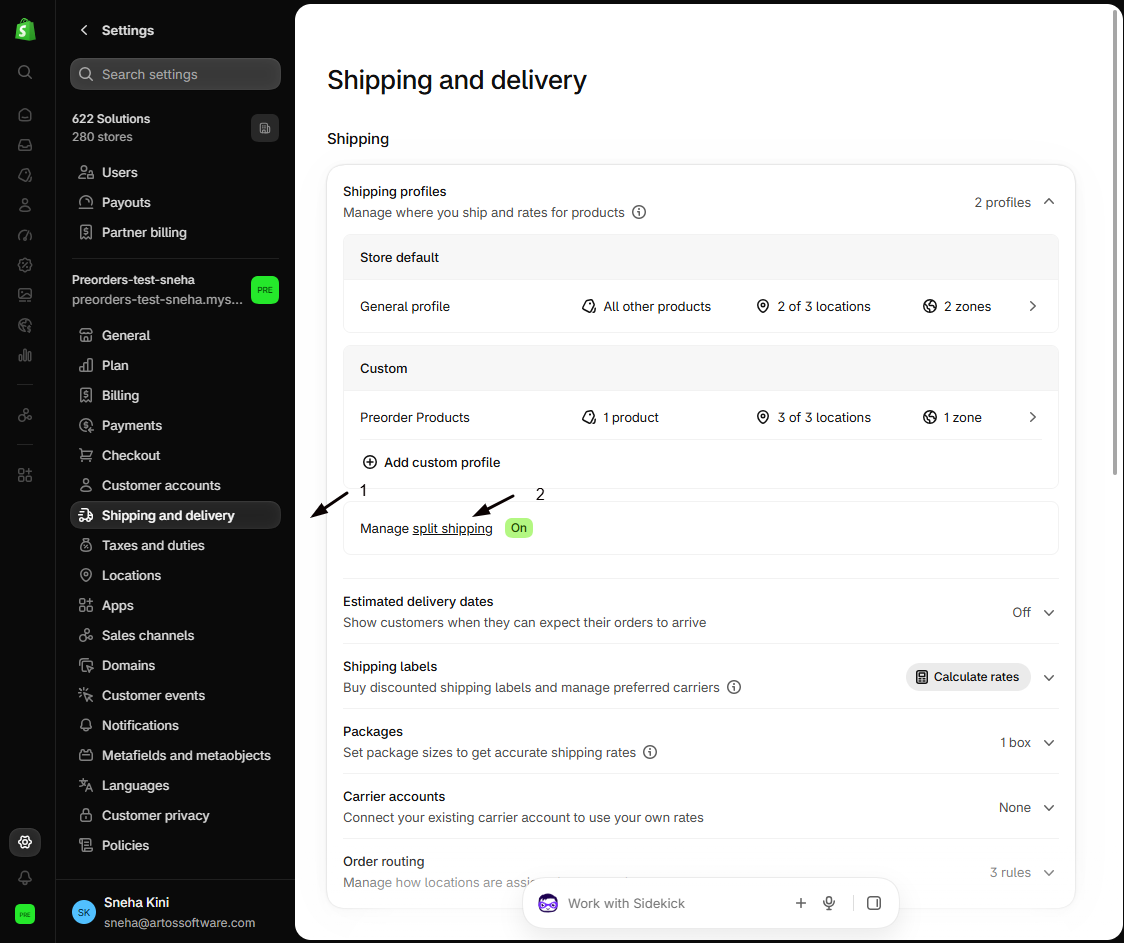
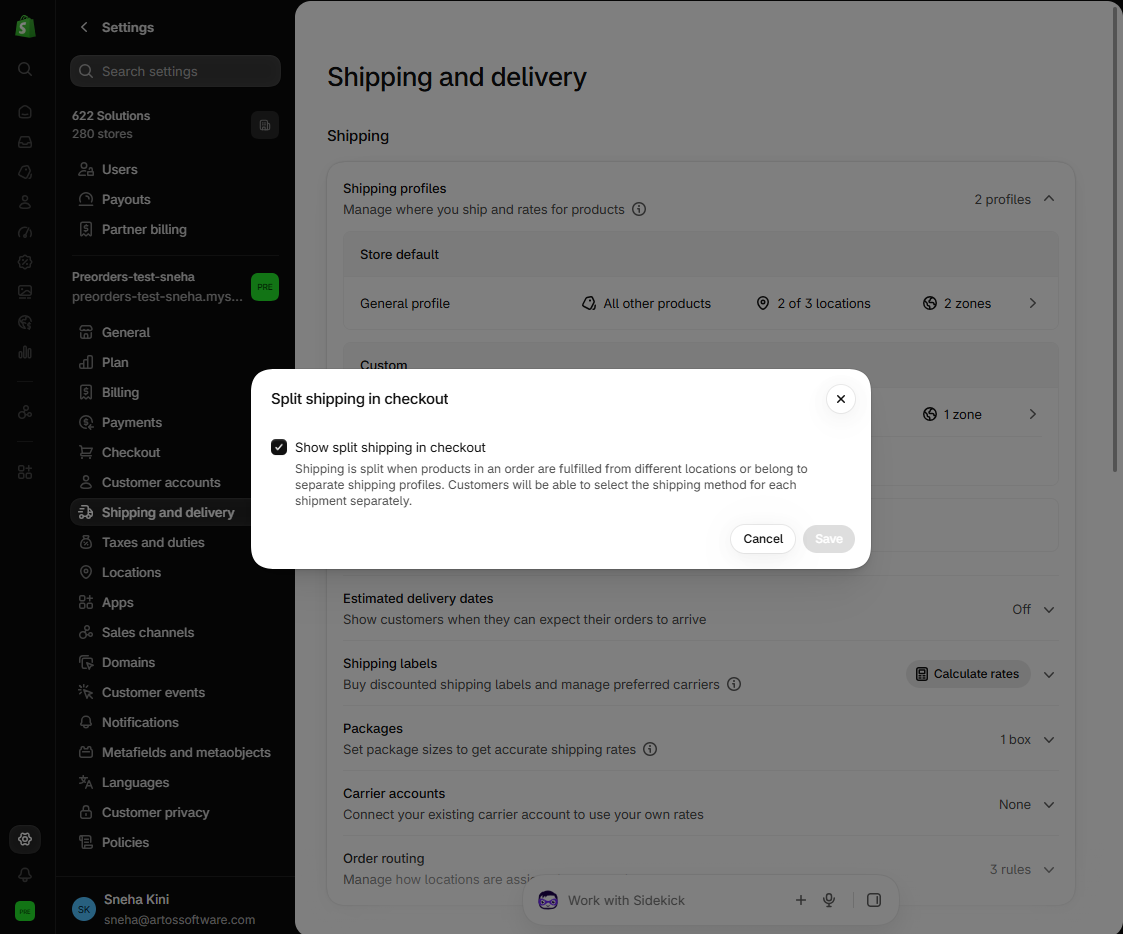
Check your setup
Section titled “Check your setup”- In Shopify admin, confirm the preorder and in-stock products share one shipping profile (Settings → Shipping and delivery).
- In STOQ, check the offer’s fulfillment status in the offer editor (Preorders in the left menu → Offers tab → open your offer → Customize → Shipping in the sidebar → Fulfillment status) and confirm it matches what you intend for checkout grouping.
- Place a test mixed order (one in-stock item plus one preorder item) through the regular storefront checkout, not an accelerated checkout button (a 100% discount code or Shopify’s Bogus Gateway avoids a real charge).
- Confirm the Shipping method step at checkout shows one shipment and one rate, not two.
Troubleshooting
Section titled “Troubleshooting”Items share the same shipping profile but the order still splits
Fulfillment timing is likely the cause. If the preorder’s status is On hold or Scheduled, set it to Unfulfilled if you want it to always group with the in-stock item, or accept the split as expected.
Items still split after matching both shipping profile and fulfillment timing
Check the location. Both products need to be fulfillable from the same location; review this in Shopify’s Settings → Locations.
You don't see a split shipping option in Settings -> Shipping and delivery
You need at least two shipping profiles or locations before that option appears.
Turning off split shipping didn't stop the split
Confirm you unchecked Show split shipping in checkout under Settings → Shipping and delivery → split shipping (or Manage) and clicked Save. This applies store-wide, to every order, not only preorders.
Limitations
Section titled “Limitations”Turning off split shipping is store-wide: there’s no per-product or per-offer setting to disable it only for preorder orders.
Is this a STOQ bug?
No. STOQ doesn’t set shipping rates or decide how checkout groups shipments, that’s entirely Shopify’s split shipping feature, based on shipping profile, location group, and fulfillment timing.
Does STOQ's Split fulfillments or Separate orders feature cause this?
No, those are separate, after-checkout behaviors. STOQ’s Split fulfillments and Separate orders settings run after checkout is complete and don’t affect what the customer is charged for shipping. The double shipping charge happens during checkout, driven entirely by Shopify’s split shipping. See Split fulfillments for preorders and Separate orders for mixed preorders for what those actually do.
Does this affect accelerated checkout buttons like Shop Pay or Apple Pay?
No. Split shipping doesn’t apply to accelerated checkouts: those always combine everything into a single shipping charge regardless of profile or timing differences.
Does changing the shipping profile affect orders already placed?
No. It only affects checkout for orders placed after you make the change; shipping charges on existing orders don’t change retroactively.
Related guides
Section titled “Related guides”Thanks for letting us know.
Still stuck? Ask Quinn or chat with support