Turn the Notify me widget on or off
Switch the whole Notify me button and signup form on or off for your storefront.
Last updated
The signup widget is the “Notify me” button and the signup form it opens. Turning it off removes it from your storefront entirely, so customers can’t join any waitlist, without touching the rest of your setup.
Turn it on or off
Section titled “Turn it on or off”On a phone, this menu is collapsed. In the Shopify mobile app, tap the STOQ logo at the top of the screen to open it, then choose the section named below. There is no hamburger icon. See Finding the STOQ menu.
-
Open the signup widget
- In the left menu bar of the STOQ app, click Back in stock alerts.
- Click the Settings tab, then open the Signup widget sub-tab.
-
Switch it
The card shows the current state, Active now or Disabled. Click Disable to switch it off, or Enable to switch it back on.
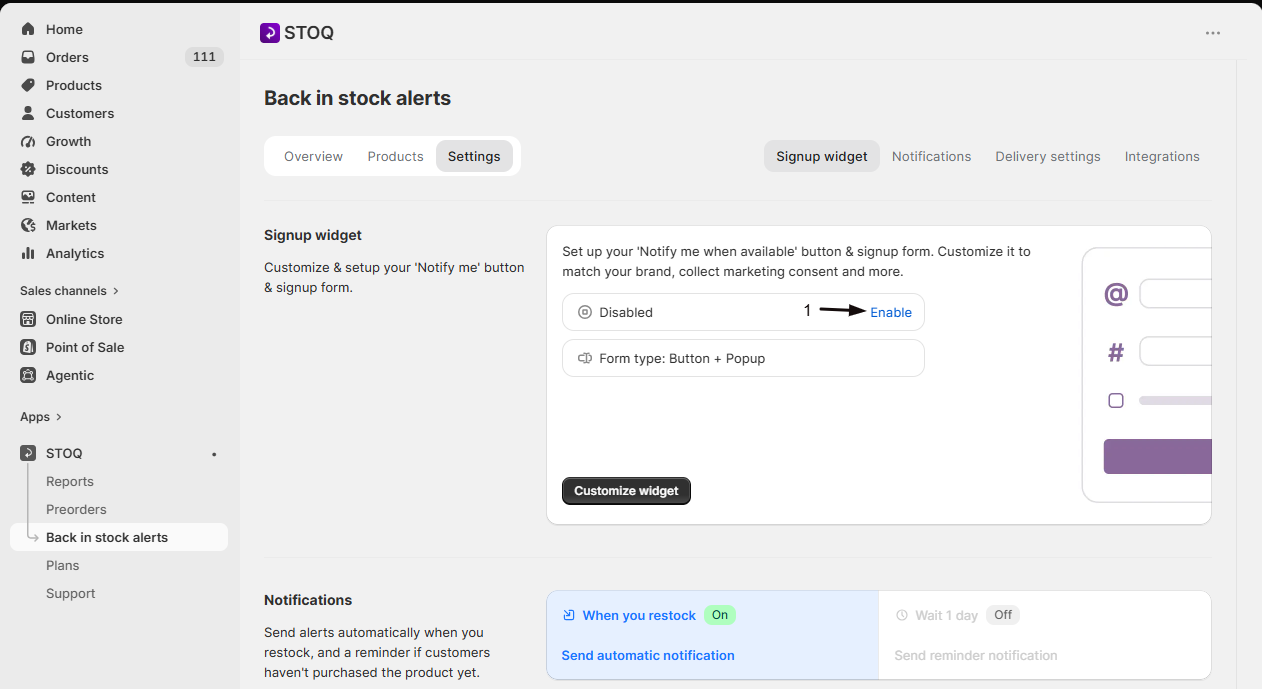
What happens when it’s off
Section titled “What happens when it’s off”- The Notify me button and signup form stop appearing on your storefront, so no new customers can join a waitlist.
- Your existing waitlist, templates, and settings are untouched. Turning it back on restores everything.
Which switch do you actually want?
Section titled “Which switch do you actually want?”Three different controls stop things, at different levels:
| Control | What it stops |
|---|---|
| This one (Signup widget) | The button and form on your storefront, so nobody can sign up |
| Send automatic notification | Automatic sending on restock. Signups still collect, and you can still send manually |
| Email or SMS channels | One channel only, leaving the other running |
If you only want to hide the button on some products rather than all, don’t disable the widget. See Choose which products show the button.
Does disabling it delete my waitlist?
No. Signups, templates, and settings all stay. It only stops the widget showing on your storefront.
Will customers already on a waitlist still get alerts?
They stay on the list. Whether an alert sends depends on your other settings, see Turn automatic alerts on or off.
The button still shows after disabling
Hard-refresh the storefront (Ctrl+Shift+R or Cmd+Shift+R) to clear the cached page.
Related guides
Section titled “Related guides”Thanks for letting us know.
Still stuck? Ask Quinn or chat with support