Send Klaviyo emails in the customer's language
Use the language STOQ syncs to Klaviyo to branch your flow and send translated back in stock and preorder emails.
Last updated
STOQ syncs each customer’s language preference to their Klaviyo profile, so you can branch your flow by language and send back in stock and preorder emails in the language the customer was browsing in.
What STOQ syncs
Section titled “What STOQ syncs”STOQ writes two language properties to the Klaviyo profile:
| Property | What it is | Example |
|---|---|---|
locale |
The two-letter language code | en, fr |
StoqLocaleCountry |
Language and country combined | en-US, fr-CA |
Before you begin
Section titled “Before you begin”| Requirement | Detail |
|---|---|
| A paid plan | The Klaviyo integration is a paid feature. |
| Klaviyo as your provider | Alerts must send through Klaviyo. See Send back in stock alerts through Klaviyo. |
Branch the flow by language
Section titled “Branch the flow by language”-
Open your STOQ flow in Klaviyo
In your Klaviyo dashboard, open the flow triggered by the STOQ metric you want to translate, for example Back in stock alert (STOQ).
-
Add a conditional split on locale
Add a conditional split that checks the profile property
locale(orStoqLocaleCountryif you want to vary by country too), with one branch per language you support.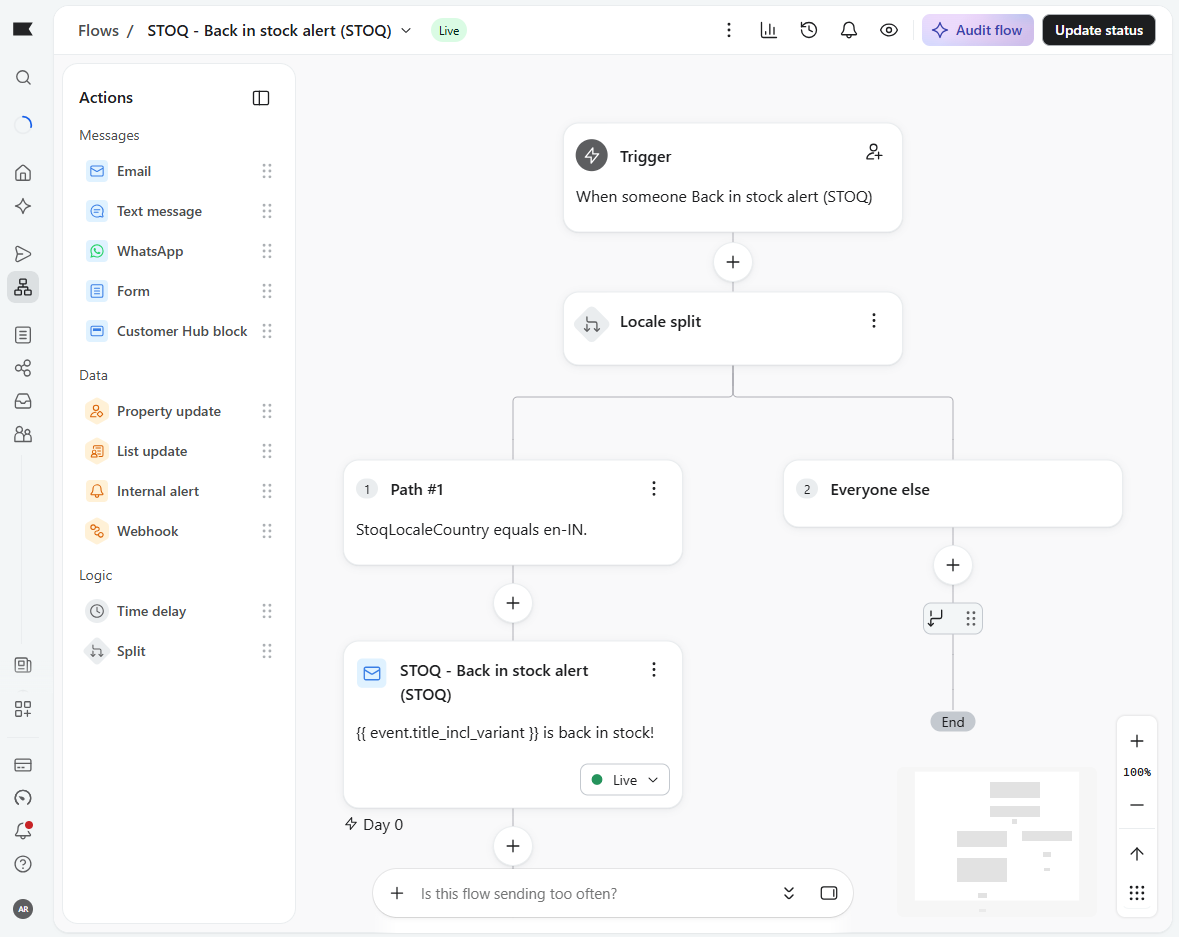
-
Add a translated email to each branch
Give each branch its own Email action with the template written in that language.
-
Set the flow live
Set the flow to Live. Customers now receive the branch that matches their language.
Check your setup
Section titled “Check your setup”Use Klaviyo’s Send test event from STOQ (or a test profile with a set locale) to confirm the test follows the branch you expect before going live.
Good to know
Section titled “Good to know”Templates and their translations live in Klaviyo, not STOQ, so you write each language’s copy in the Klaviyo editor. Product and variant titles are not translated automatically in the Klaviyo path, so translate any product wording in your template. You’ll need a branch in each flow you use, including alerts, reminders, and preorder confirmations.
Do product titles come through translated?
Not through Klaviyo. STOQ sends titles in your store’s default language, so add translations in your Klaviyo template if you need them. STOQ’s built-in email sending does translate titles, covered in Send alerts in multiple languages.
Which property should I split on?
Use locale to branch by language only, or StoqLocaleCountry to branch by language and country, for example to separate fr-FR from fr-CA.
A profile has no language and falls through
Give the conditional split a default branch with your primary language so profiles without a locale still get an email.
Related guides
Section titled “Related guides”Thanks for letting us know.
Still stuck? Ask Quinn or chat with support