Set up SMS alerts
Let customers sign up with their phone number and receive a text the moment a product is back in stock.
Last updated
SMS alerts let customers sign up for a restock notification with their phone number instead of (or in addition to) email, and receive a text message automatically when the product comes back in stock. SMS requires a paid plan and carries a per-message cost that varies by country.
In this section: Use branded links in SMS · Turn off SMS alerts
Before you begin
Section titled “Before you begin”| Requirement | Detail |
|---|---|
| Plan | SMS alerts require a paid plan. The toggle is disabled with an upgrade prompt on free plans. |
| Carrier verification | Before SMS can be sent, STOQ must verify your store for restricted content with network carriers. Customers can still sign up in the meantime, sending is simply paused until verification completes. |
| Cost | Each SMS segment costs money, billed to your store. Cost varies by destination country (see the FAQ below for typical rates). |
| Toll-free number registration | On stores where this is enabled, you’ll be asked to register your business for a dedicated toll-free number before turning SMS on. |
Choose your setup
Section titled “Choose your setup”Back in stock alerts can notify customers by email, SMS, or both. Use this comparison to decide whether to add SMS alongside email:
| SMS | ||
|---|---|---|
| Cost | Included in your plan (subject to plan sending limits) | Per-message charge, billed on top of your plan, varying by destination country |
| Setup | No carrier registration required | May require toll-free number registration and carrier verification before sending starts |
| Character limits | Effectively unlimited | Messages are billed in segments; longer messages, emojis, accented characters, and non-Latin scripts use more segments and cost more |
| Unsubscribe | Standard unsubscribe link | Customer replies to the text; handled automatically |
| Alternate providers | Klaviyo | Klaviyo or Postscript, in addition to STOQ’s built-in sending |
What customers will see
Section titled “What customers will see”Once SMS is enabled, the storefront “Notify me” signup form can collect a phone number (in addition to, or instead of, email, depending on how you’ve configured the signup form). When you restock the product, subscribed customers receive a text message built from your SMS content template, linking to checkout or the product page.
Customers can unsubscribe from future alerts by replying to the SMS (STOP for US/Canada numbers; other countries get a different reply keyword). This is handled automatically and customers won’t receive further texts.
Set it up
Section titled “Set it up”On a phone, this menu is collapsed. In the Shopify mobile app, tap the STOQ logo at the top of the screen to open it, then choose the section named below. There is no hamburger icon. See Finding the STOQ menu.
-
Open the Channels panel
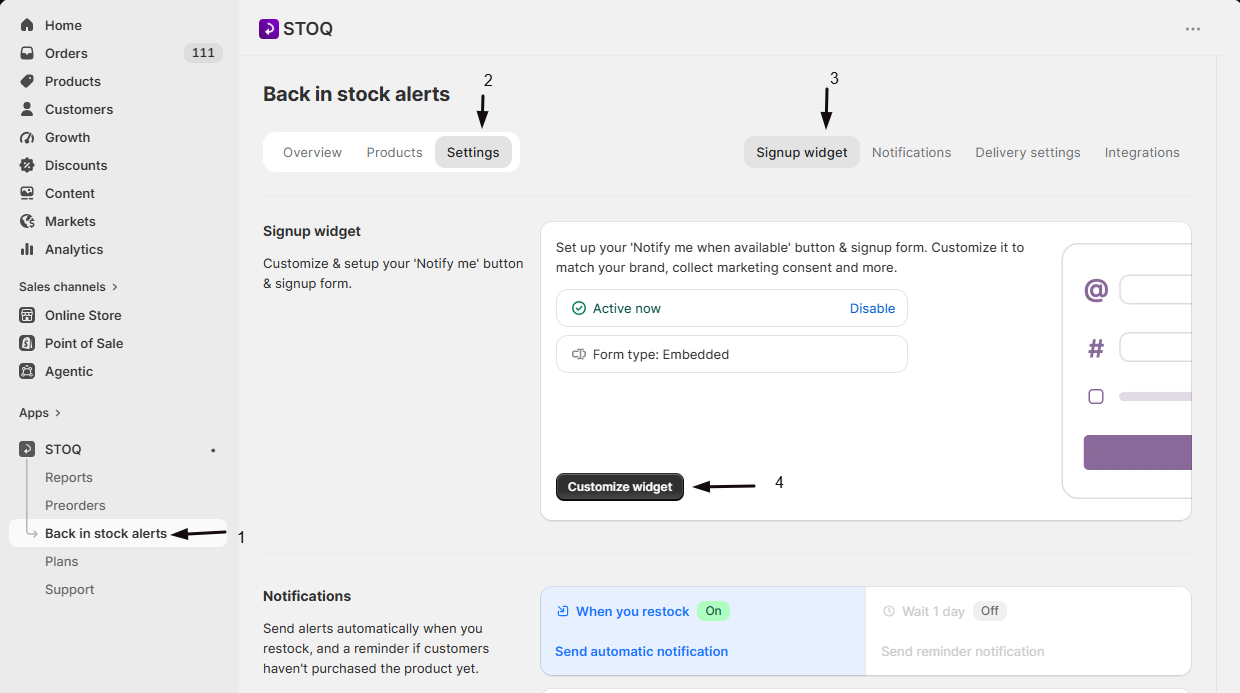
- In the left menu bar of the STOQ app, click Back in stock alerts.
- Click the Settings tab.
- Open the Signup widget sub-tab.
- Click Customize widget.
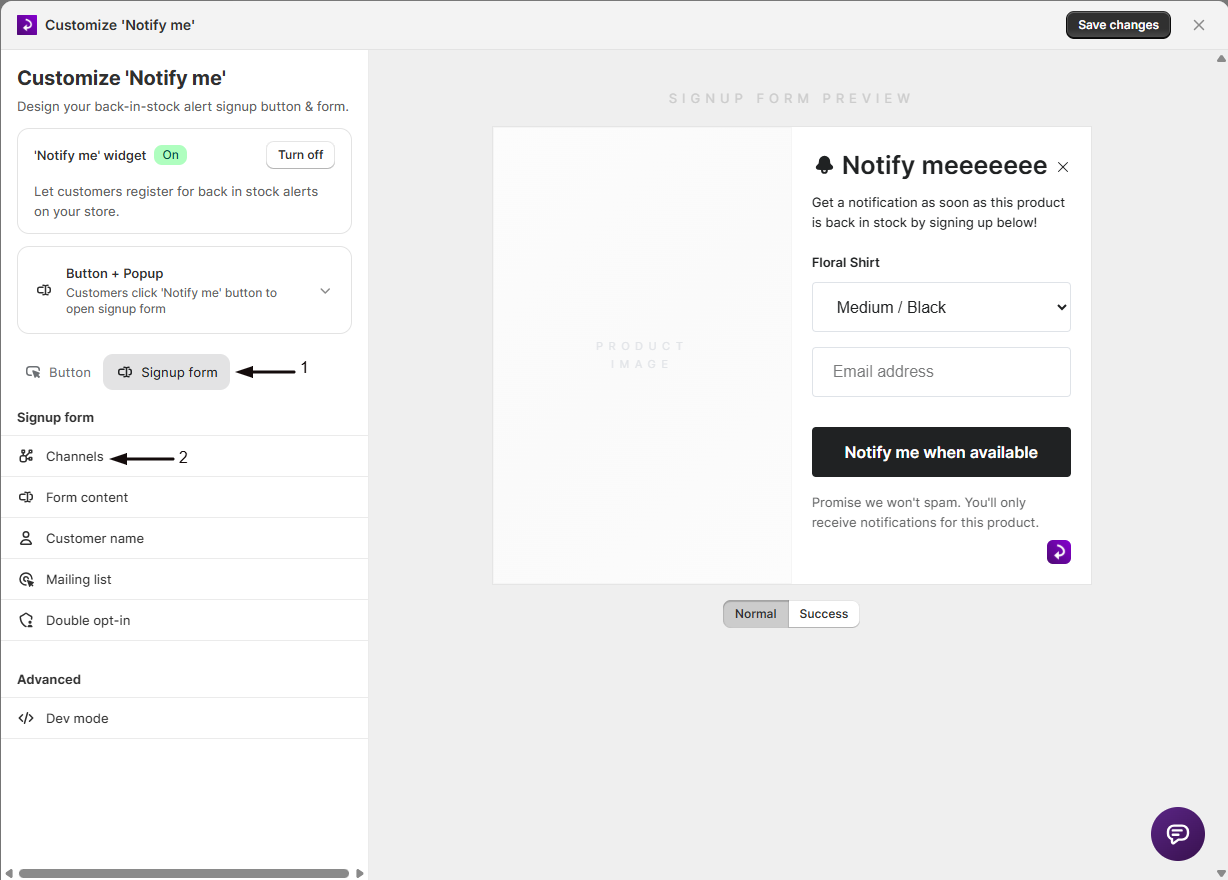
- Open the Signup form tab.
- Click Channels in the sidebar.
-
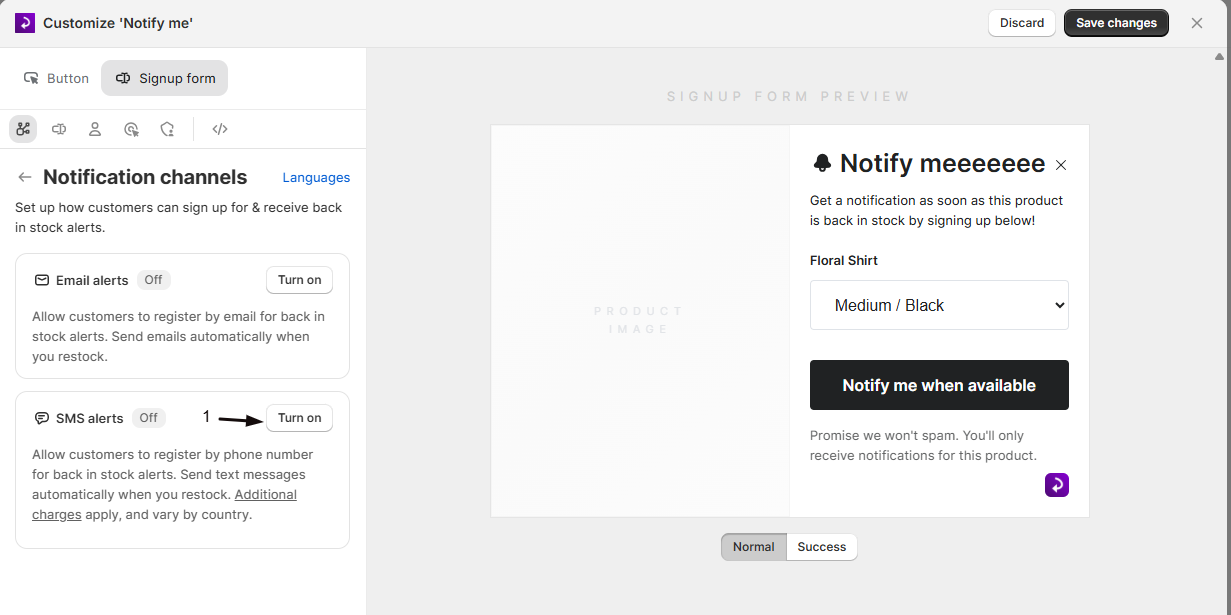
Toggle SMS alerts on
Switch on SMS alerts. If you’re on a free plan, you’ll see an upgrade prompt instead of the toggle.
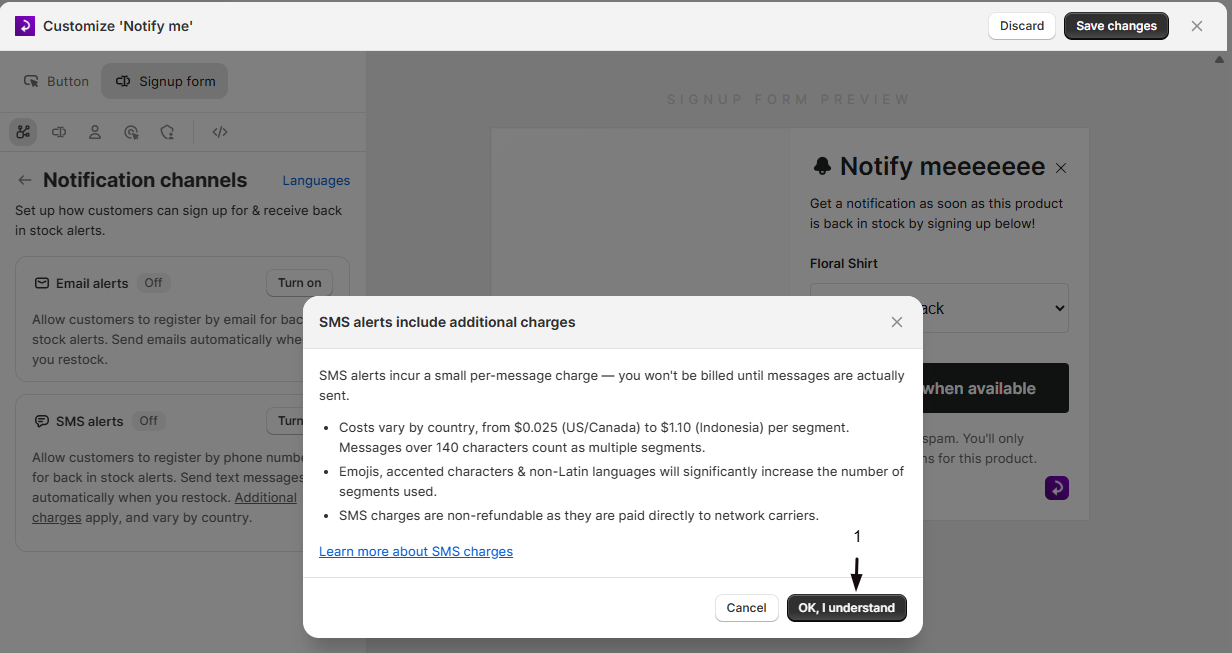
A confirmation dialog appears explaining that SMS incurs a small per-message charge, with example per-segment costs from $0.025 for US and Canada up to $2.20 for some countries. Messages over 140 characters, emojis, accented characters, and non-Latin scripts use more segments. Charges are non-refundable, since STOQ pays them directly to network carriers. Confirm to continue.
-
Complete toll-free registration, if required
If your store is asked to register a dedicated toll-free sending number, fill out the registration form: business name, website, business type, registration number (if not a sole proprietor), business address, contact details, and links to your store’s terms and privacy policy.
Submitting the form queues it for STOQ’s team to review before it’s submitted to the carrier for approval, you don’t need to wait for approval to keep going. Submitting the form also automatically turns on the marketing consent checkbox on your storefront signup form, using compliant consent wording (unchecked by default, so customers opt in explicitly).
-
Choose where SMS sends from
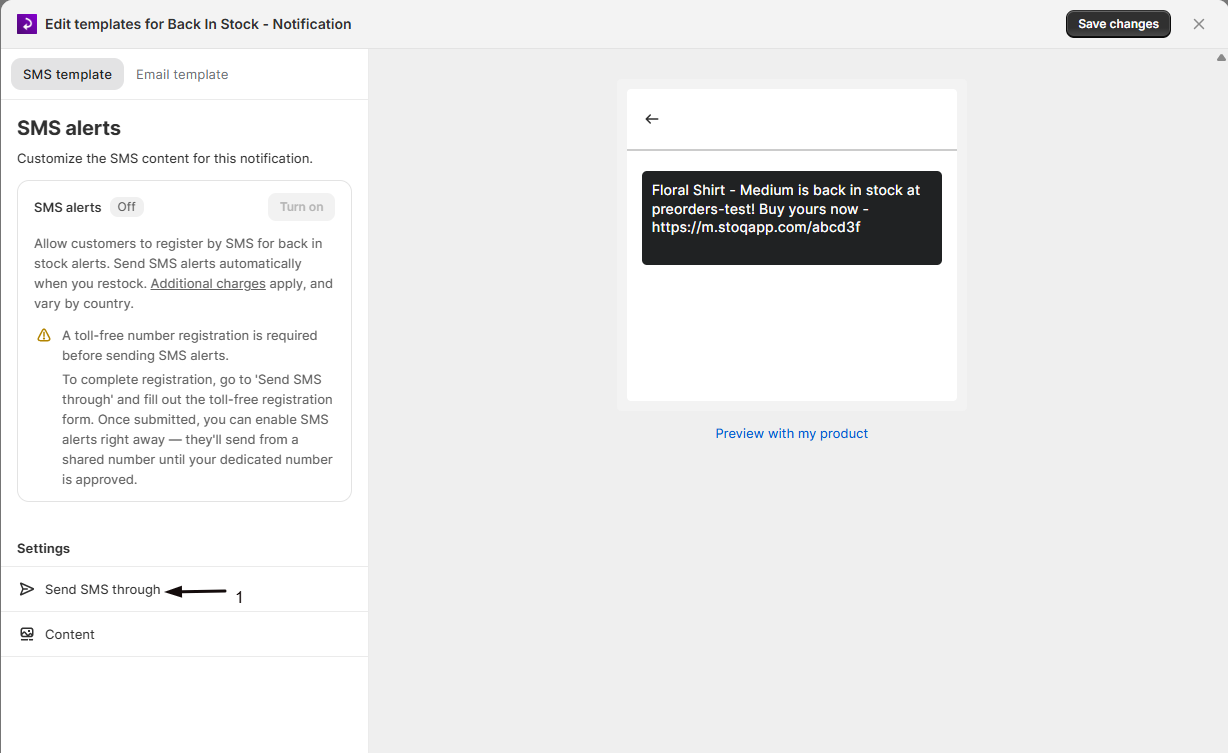
Open Send SMS through to confirm you’re using the STOQ provider, the default, or switch to Klaviyo or Postscript if you use one of those platforms instead.
While your toll-free registration is under review, SMS still sends, from a shared number, and switches automatically to your dedicated number once it’s approved.
-
Customize the message content
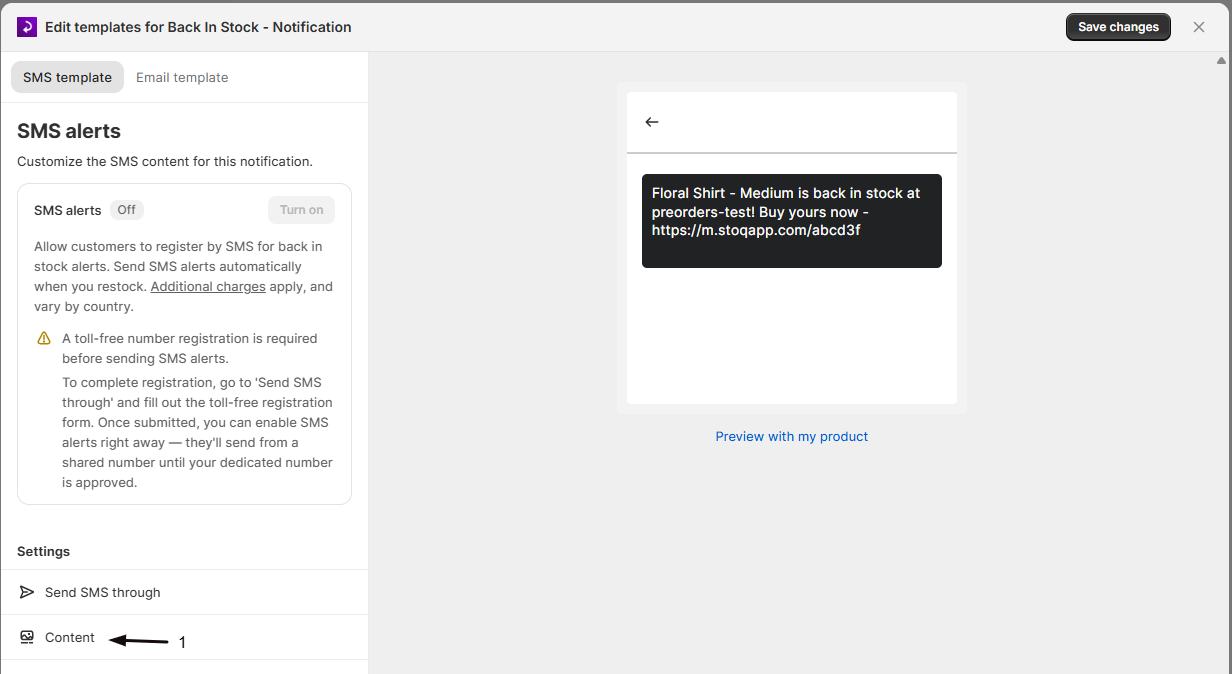
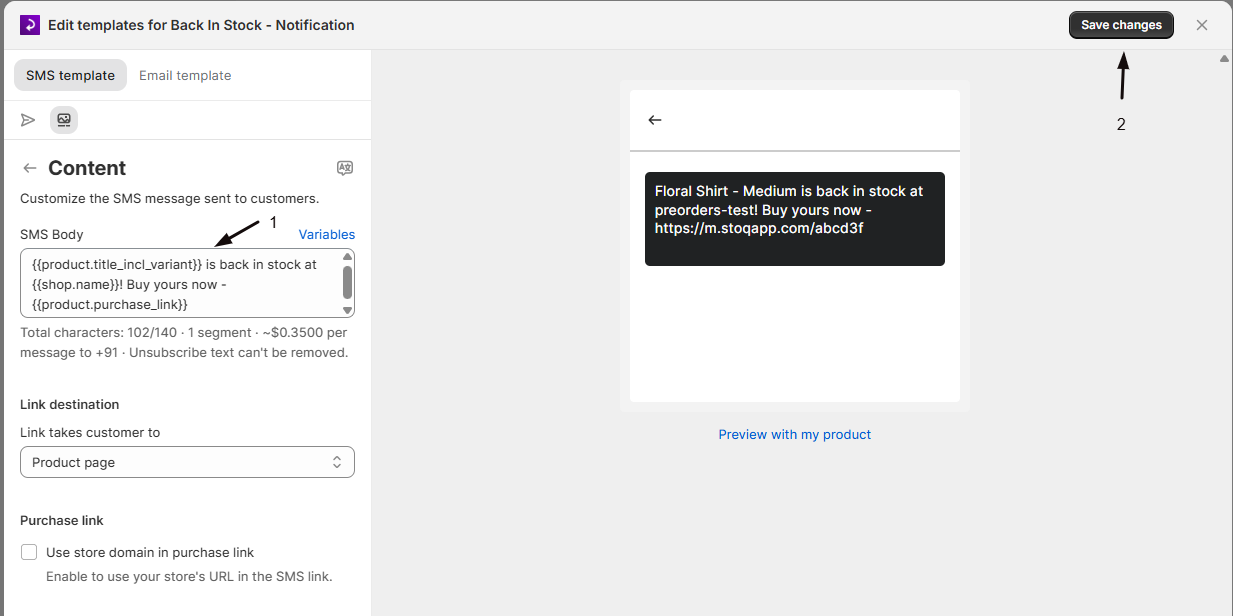
Open Content to edit the SMS text and choose the link destination, checkout or product page. Use the available Liquid variables (customer name, product title, purchase link, store name, and more) to personalize the message.
-
Save your changes
Click Save changes in the notification editor. SMS alerts will now send to any customer who signed up with a phone number, once the product is restocked.
Check your setup
Section titled “Check your setup”To check the message content first, click Preview with my product below the preview in the SMS editor and pick one of your products, so the preview uses real product details instead of the sample. The preview then reads Previewing [product], with Change and Reset links to swap or clear it.
Then confirm a real send end to end:
- Sign up for a back in stock alert on your storefront using a phone number.
- Restock the product from your Shopify admin (or however your inventory updates).
- Confirm the text message arrives on the phone used to sign up, with the correct product name and a working purchase link.
Troubleshooting
Section titled “Troubleshooting”The SMS alerts toggle is disabled
You’re either on a free plan, which requires an upgrade, or your store hasn’t yet submitted its toll-free number registration where that’s required. The toggle shows a tooltip explaining which applies to your store.
Customers sign up but never receive a text
Sending is paused until your store completes carrier verification for restricted content. Check the SMS settings panel for a verification warning banner; sending resumes automatically once verification completes.
Messages are sending from a shared number instead of your own
Your toll-free registration is still under carrier review. STOQ sends from a shared number in the meantime and switches automatically to your dedicated number once it’s approved.
Limitations
Section titled “Limitations”Some countries aren’t supported for SMS delivery due to carrier restrictions, and specific phone number prefixes may be blocked in others to comply with local regulations. Check the SMS settings panel for any blocked country codes for your store.
How much does each SMS cost?
Cost is billed per message segment and depends on the destination country’s phone number: from $0.025 per segment for US and Canada numbers, up to $2.20 for some countries. Messages longer than about 140 characters, or containing emojis, accented characters, or non-Latin scripts, are split into multiple segments and billed accordingly.
My toll-free registration is pending, can I still send SMS?
Yes. Once you submit the registration form, you can enable SMS right away. Messages send from a shared toll-free number while your dedicated number is under review, and STOQ automatically switches you to your own number once it’s approved.
Can I use a provider other than STOQ's built-in SMS?
Yes. Under “Send SMS through,” paid plans can switch to Klaviyo or Postscript, which handle their own message delivery and billing (Klaviyo/Postscript charges are separate from STOQ’s per-segment costs). Each requires its own connection and flow setup in that platform.
Can customers opt out of SMS alerts?
Yes, replying to the SMS with the unsubscribe keyword shown in the message (STOP for US/Canada numbers) automatically unsubscribes that phone number from future alerts.
Does turning on SMS affect customers who already signed up with email?
No. Existing subscribers who signed up without a phone number keep receiving email alerts as before; they only start getting texts if they resubscribe and add a phone number.
Related guides
Section titled “Related guides”Thanks for letting us know.
Still stuck? Ask Quinn or chat with support