Turn on email and SMS channels
Choose which channels customers can sign up with for Back in Stock alerts, and how you deliver them.
Last updated
Use this guide to turn on email and/or SMS as channels for Back in Stock alerts. By the end, customers will see an email field, a phone number field, or both on the “Notify me” form, and receive the restock alert through whichever channel you turned on.
Before you begin
Section titled “Before you begin”| You need | Why |
|---|---|
| Access to the Back in stock alerts section of the app | Channels live under Signup widget → Customize widget → Signup form → Channels |
| A paid plan, to turn on SMS | Email alerts are available on all plans; SMS alerts require a paid plan |
Choose your setup
Section titled “Choose your setup”Email and SMS are each their own on/off toggle, and you can turn on one or both:
- Email: on by default, available on every plan, and needs no setup or verification.
- SMS: requires a paid plan, and carries a per-message carrier charge once alerts start sending.
Most stores start with Email only, since it’s free and needs no verification, then add SMS later.
What customers will see
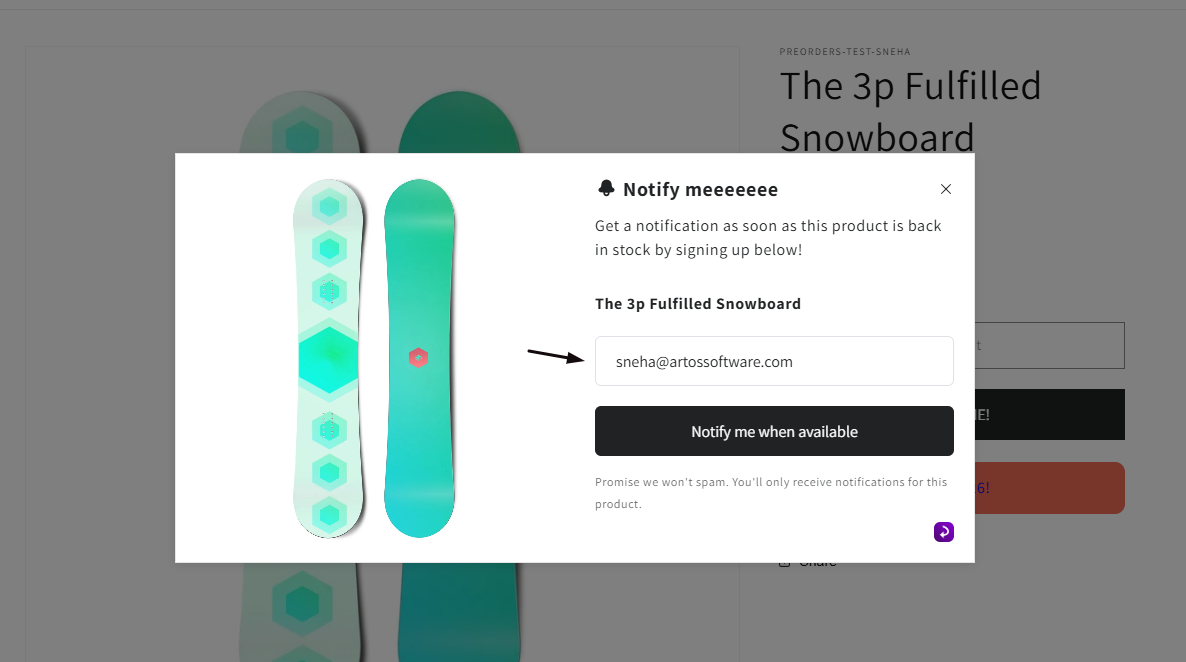
Section titled “What customers will see”- Only Email on: the form shows an email field.
- Only SMS on: the form shows a phone number field.
- Both on: the form shows both options, and customers pick which channel to sign up with.
- Both off: the “Notify me” button and form won’t collect any way to reach the customer, so at least one channel should stay on for alerts to be useful.
Set it up
Section titled “Set it up”On a phone, this menu is collapsed. In the Shopify mobile app, tap the STOQ logo at the top of the screen to open it, then choose the section named below. There is no hamburger icon. See Finding the STOQ menu.
-
Open Channels
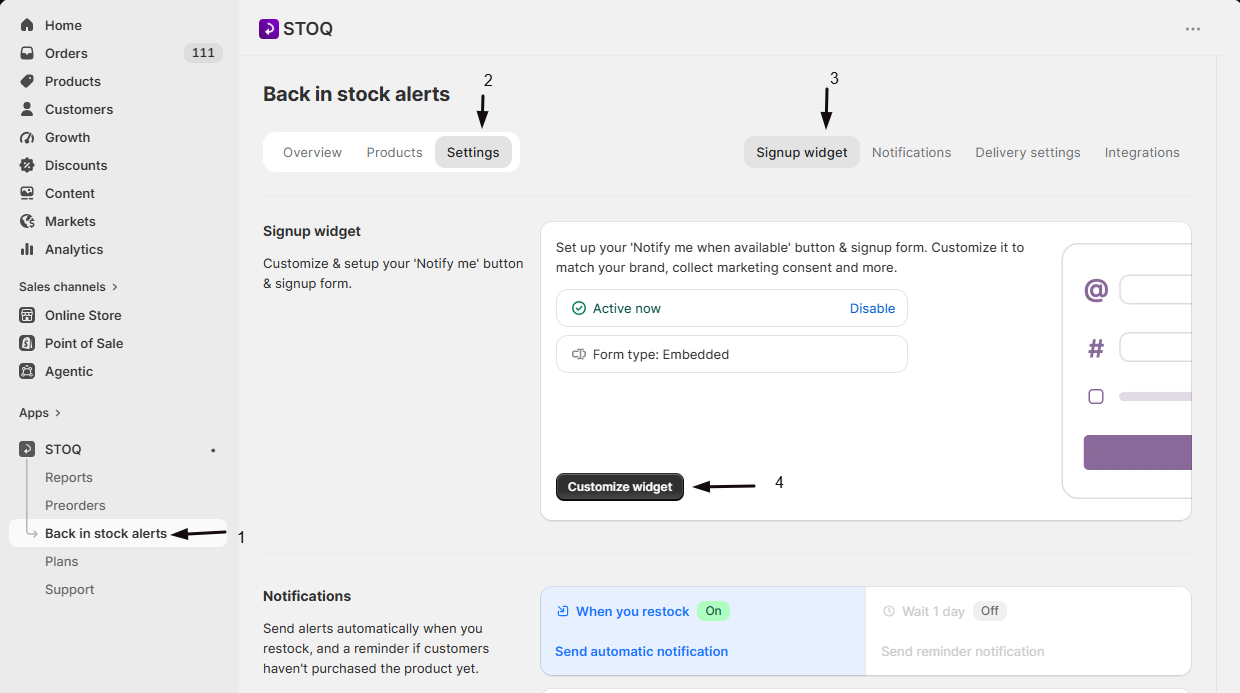
- In the left menu bar of the STOQ app, click Back in stock alerts.
- Click the Settings tab.
- Open the Signup widget sub-tab and click Customize widget to open the widget editor.
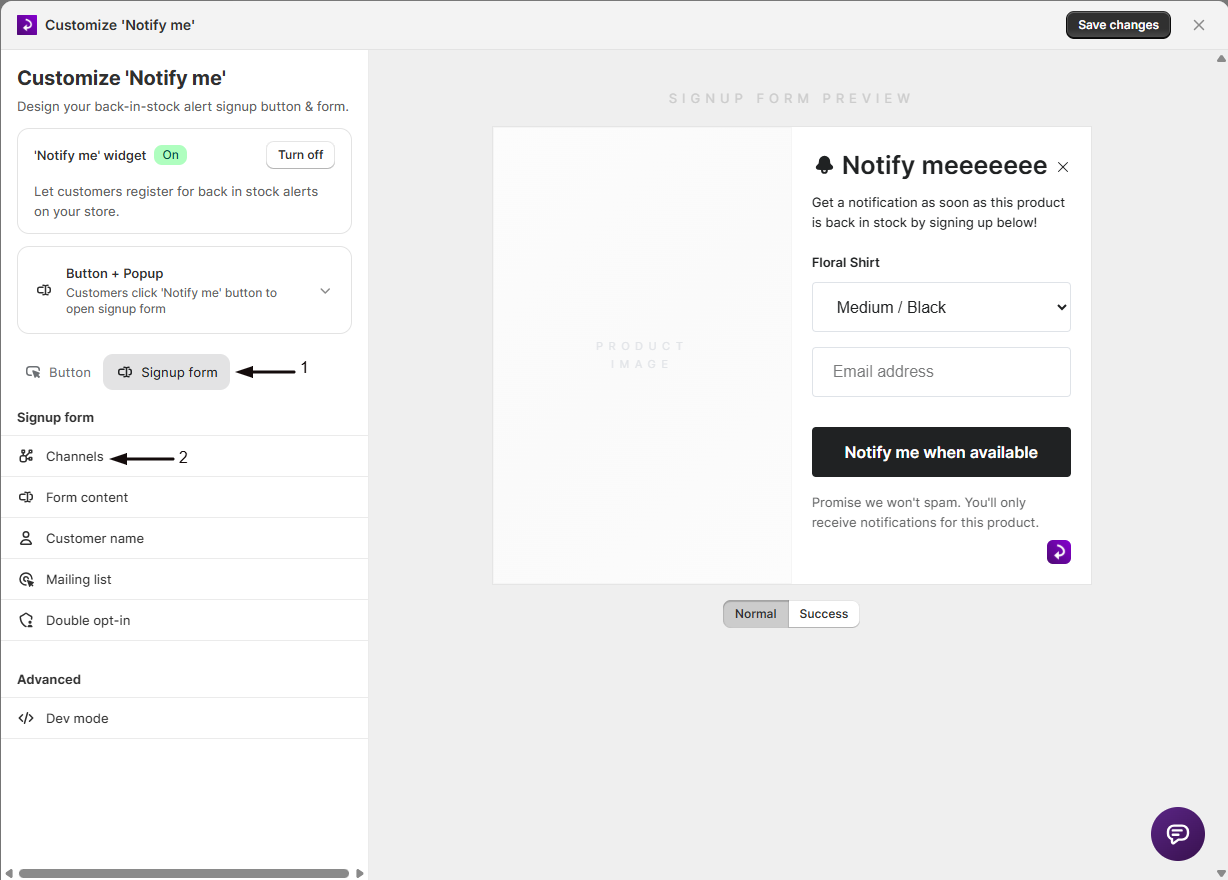
- Open the Signup form tab.
- Click Channels in the sidebar.
-
Turn on Email alerts
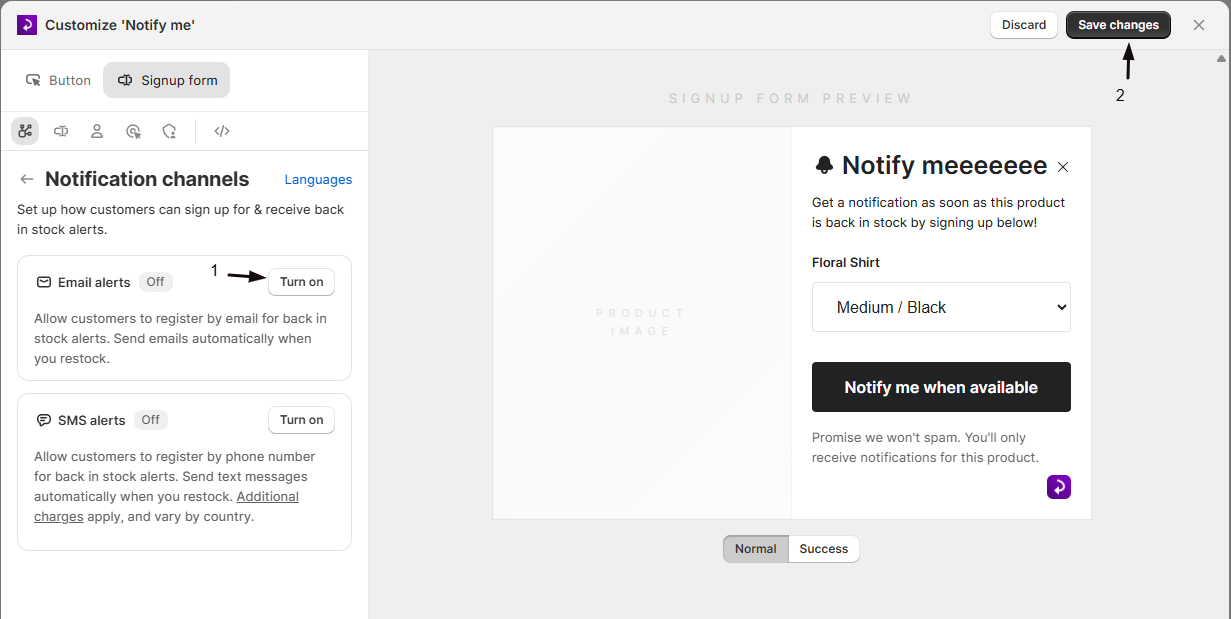
Toggle Email alerts on or off. It’s on by default; turning it off removes the email field from the signup form, so customers can no longer register by email for that store.
-
Turn on SMS alerts
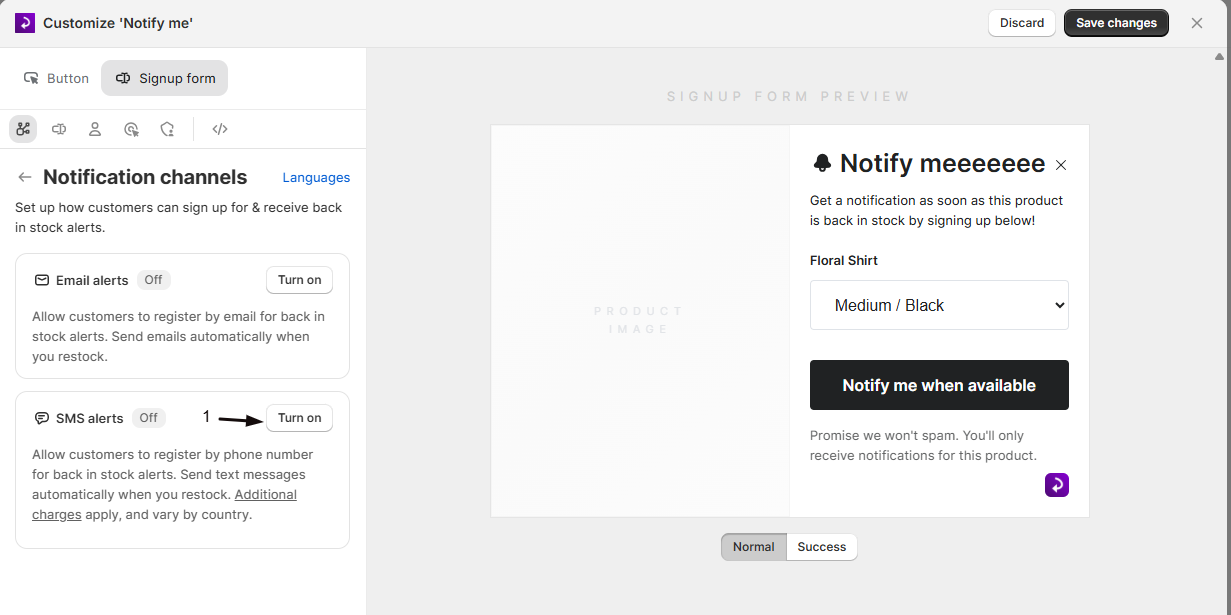
Toggle SMS alerts on. If you’re not on a paid plan, the toggle is disabled and shows an Upgrade link instead, and you’ll need to upgrade before SMS can be enabled.
-
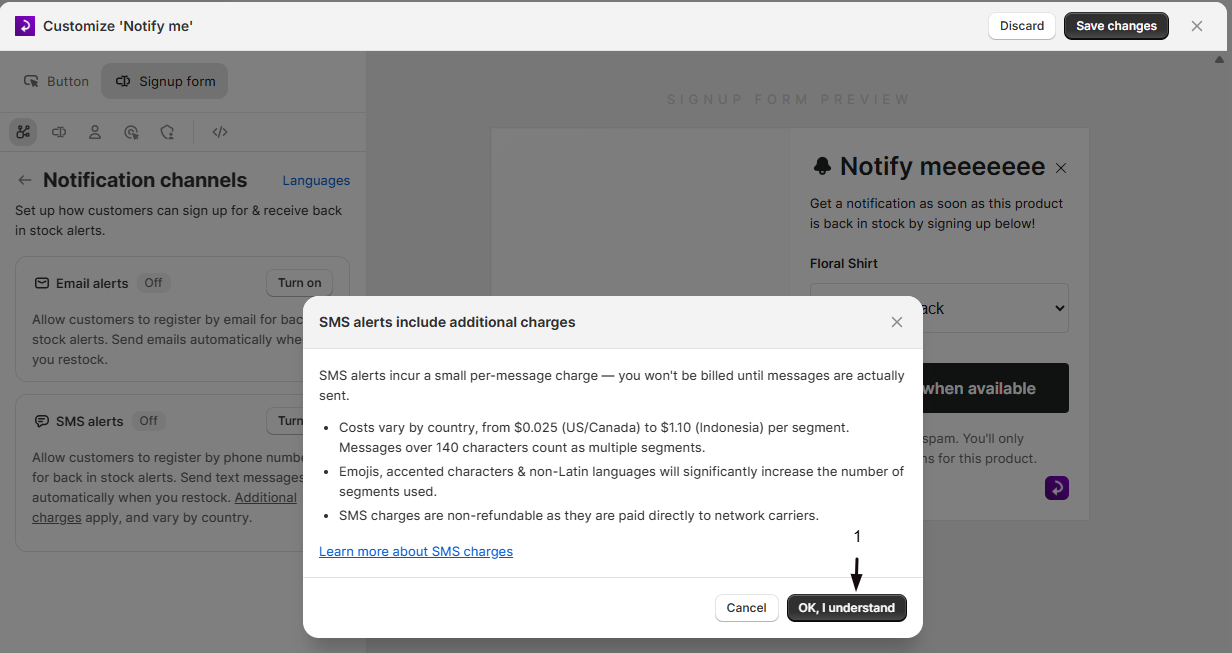
Confirm the charges notice
Turning SMS on for the first time shows a confirmation dialog about the per-message carrier charge. The OK, I understand button is disabled for a few seconds; wait, then click it to switch the toggle on.
-
Complete carrier verification if prompted
If your store isn’t yet verified for SMS, a warning banner appears: customers can still sign up by phone number, but no text messages will send until STOQ completes carrier verification for your store.
Check your setup
Section titled “Check your setup”-
Open the signup form editor’s preview pane after toggling a channel: the corresponding field (email or phone) should appear or disappear immediately.
-
Use Test Back in Stock Alerts to confirm a signup and restock actually deliver through the channel you enabled.
Troubleshooting
Section titled “Troubleshooting”The SMS alerts toggle is greyed out
SMS alerts require a paid plan. Upgrading unlocks the toggle.
Customers say they never received a text after you turned SMS on
Your store may still need carrier verification. Check the Channels panel for a verification warning banner; customers can sign up by phone during this time, but no messages send until verification completes.
Some customers say SMS alerts aren't available even though SMS is on and your store is verified
Certain phone country codes can be automatically restricted from receiving SMS to comply with local carrier regulations. This is applied at the account level for compliance reasons, not a setting you toggle.
The 'Notify me' form isn't collecting a way to reach customers
Check that at least one channel, Email or SMS, is turned on.
Do I have to enable both Email and SMS?
No. Each channel can be turned on or off independently. Most stores start with Email only, since it’s free and needs no verification, then add SMS later.
Will I be charged for every customer who signs up by phone?
No. You’re only charged when an actual SMS message sends (e.g., when you restock and alerts go out), not for the sign-up itself.
Why does one SMS cost more for some customers than others?
Carrier charges vary by destination country, and messages using emojis, accented characters, or non-Latin scripts can be split into multiple billed segments even if they look like one short message.
Can I turn off Email and only use SMS?
Yes: toggle Email off and SMS on. Just be sure at least one channel stays enabled, otherwise the signup form has no way to capture customers.
Related guides
Section titled “Related guides”Thanks for letting us know.
Still stuck? Ask Quinn or chat with support