Notify for any variant restock
Let a signup for one variant get notified when any variant of the product restocks, instead of waiting for that exact option.
Last updated
Use this guide if you want a customer who signed up for one variant to get notified when any variant of the same product restocks, not just the exact one they picked. By the end, waiting signups on the products you choose will get an alert whenever any variant of that product comes back in stock.
Before you begin
Section titled “Before you begin”Turning on any-variant notifications requires a paid plan. On a free plan, the option is disabled with an Upgrade link instead of a toggle.
Choose your setup
Section titled “Choose your setup”Any-variant alerts make sense when your variants aren’t a strict substitute the customer cares about, for example:
- One-size or one-material products where the “variant” is really just a SKU/location technicality, not a meaningful choice (e.g., a scarf sold as one size but tracked as several near-identical option values).
- Restock-adjacent options like packaging or bundle variants, where a customer who signed up would likely be satisfied by any of them coming back.
- Low-variant-count products where getting an alert a little early (for a similar option) is better than the customer missing the restock window entirely.
It’s a worse fit for products where variants are a real choice the customer cares about: a T-shirt in size Small isn’t a substitute for size XL, and a red version isn’t what someone who wanted blue was waiting for.
You also choose which products any-variant notifications apply to:
- All products: applies to every product in your store.
- Selected products only: pick specific products from a product picker.
Any product not covered by your choice keeps the default behavior: a signup is only notified when the exact variant it signed up for restocks.
What customers will see
Section titled “What customers will see”Customers don’t see anything different on the signup form itself; they still sign up for the specific variant they’re viewing. The difference shows up later: for a product covered by any-variant notifications, when any variant of that product restocks, all of its waiting signups can be notified, not only the signup’s original variant. The notification content isn’t customized to call this out, so from the customer’s side it just looks like “the product is back.”
Set it up
Section titled “Set it up”On a phone, this menu is collapsed. In the Shopify mobile app, tap the STOQ logo at the top of the screen to open it, then choose the section named below. There is no hamburger icon. See Finding the STOQ menu.
-
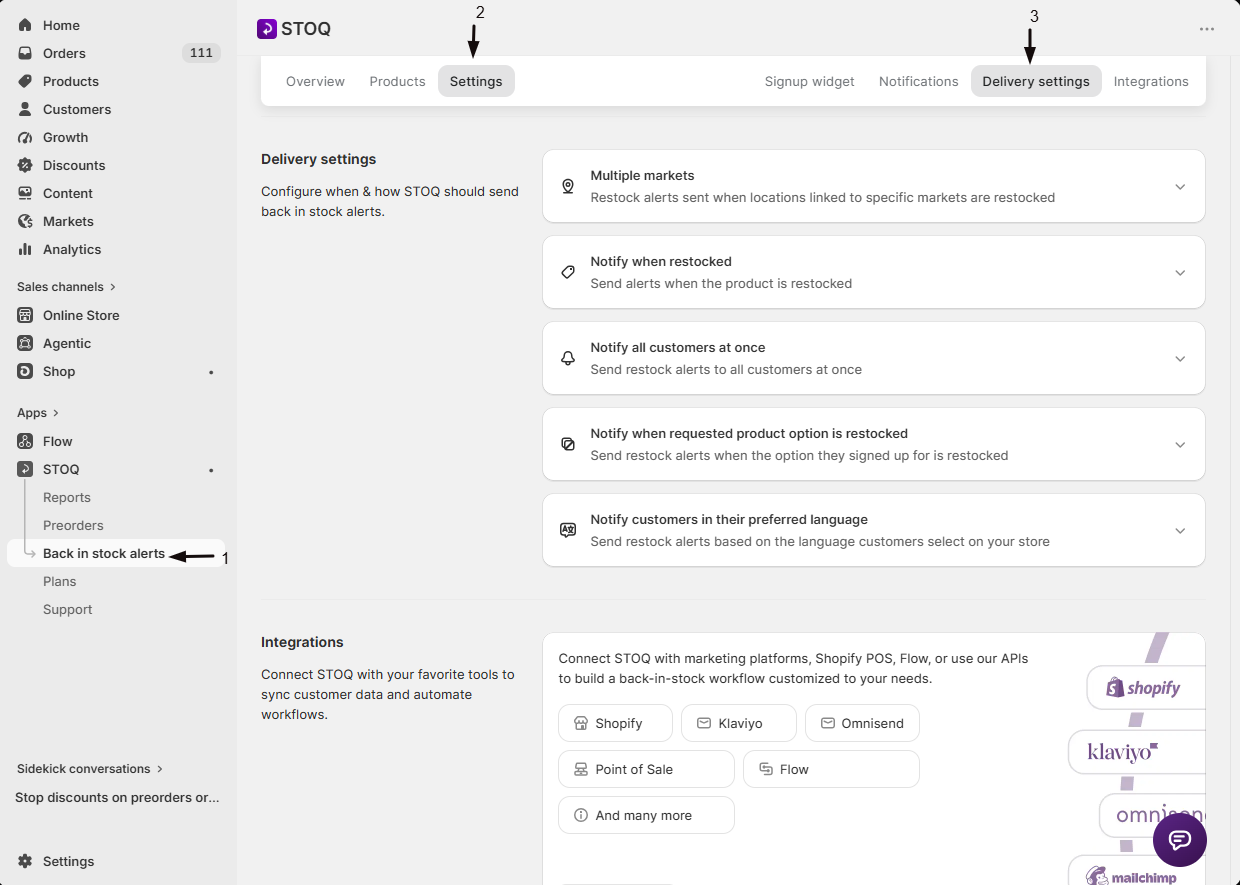
Open Delivery settings
- In the left menu bar of the STOQ app, click Back in stock alerts.
- Click the Settings tab.
- Open the Delivery settings sub-tab.
-
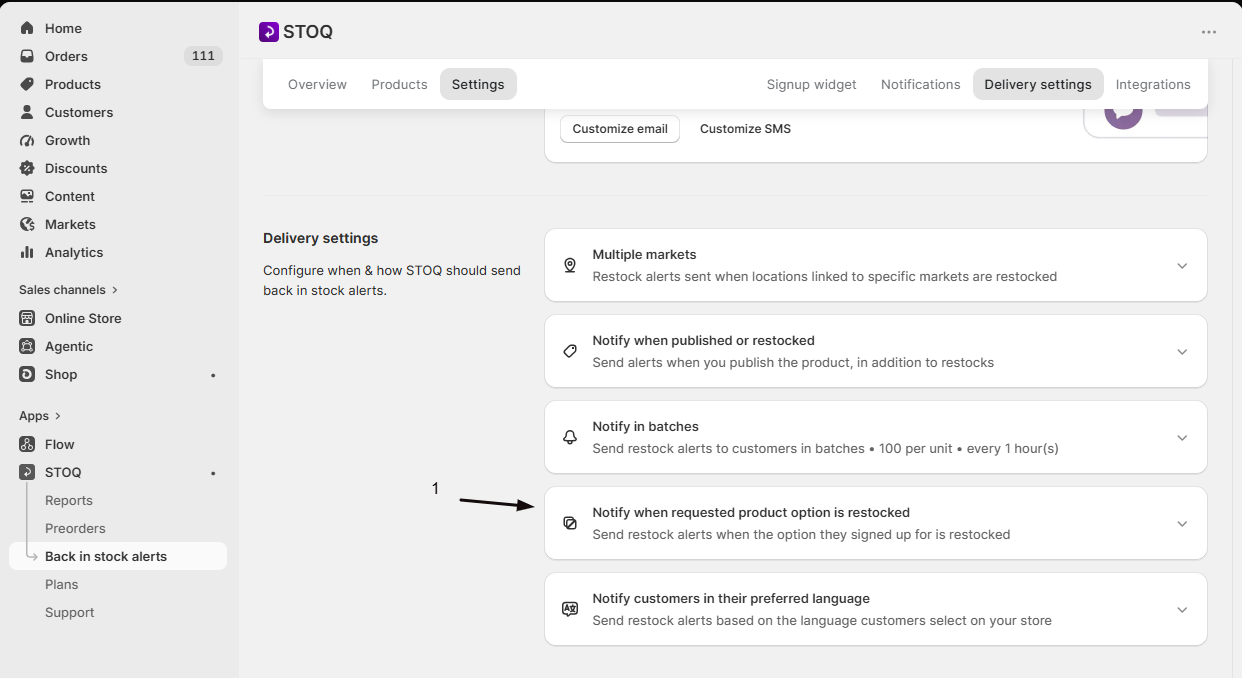
Find the variant notification card
Look for the card showing either “Notify when requested product option is restocked” (the default) or “Notify when any product option is restocked” (if already turned on).
-
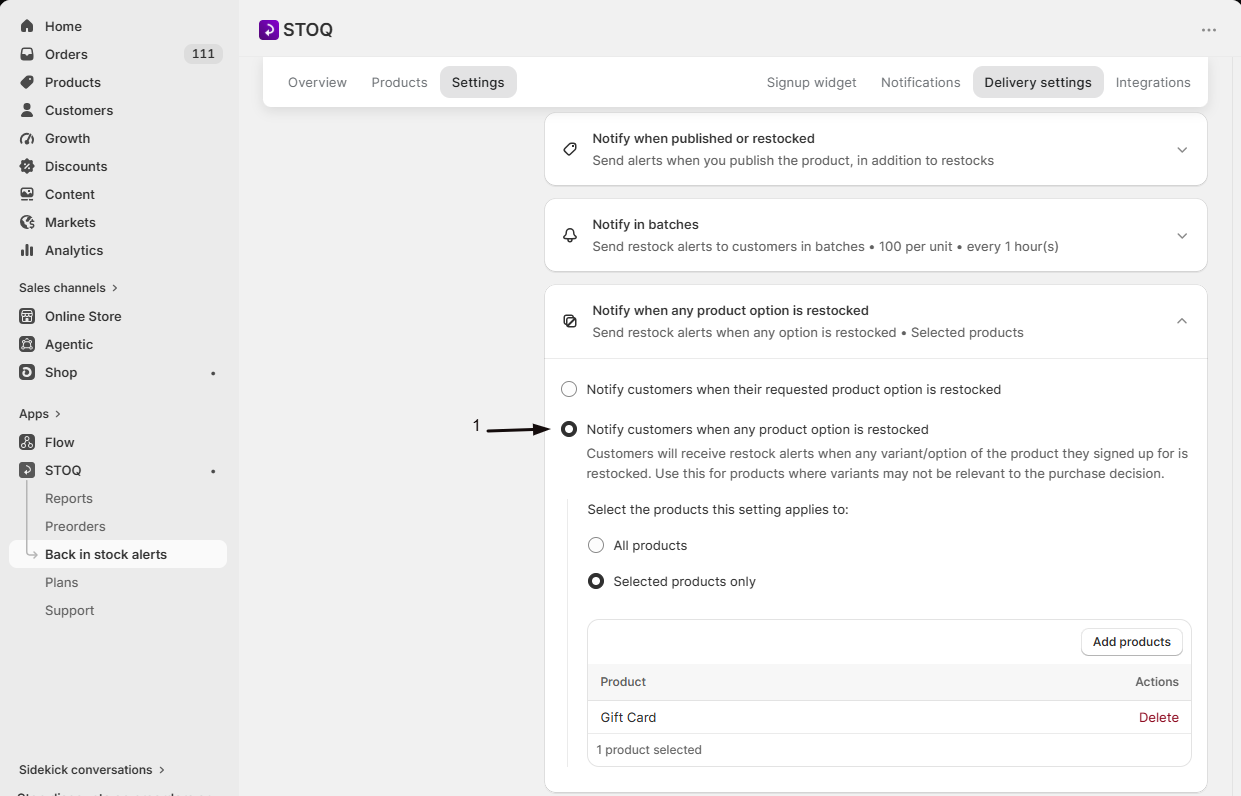
Turn on any-variant matching
Select Notify customers when any product option is restocked.
-
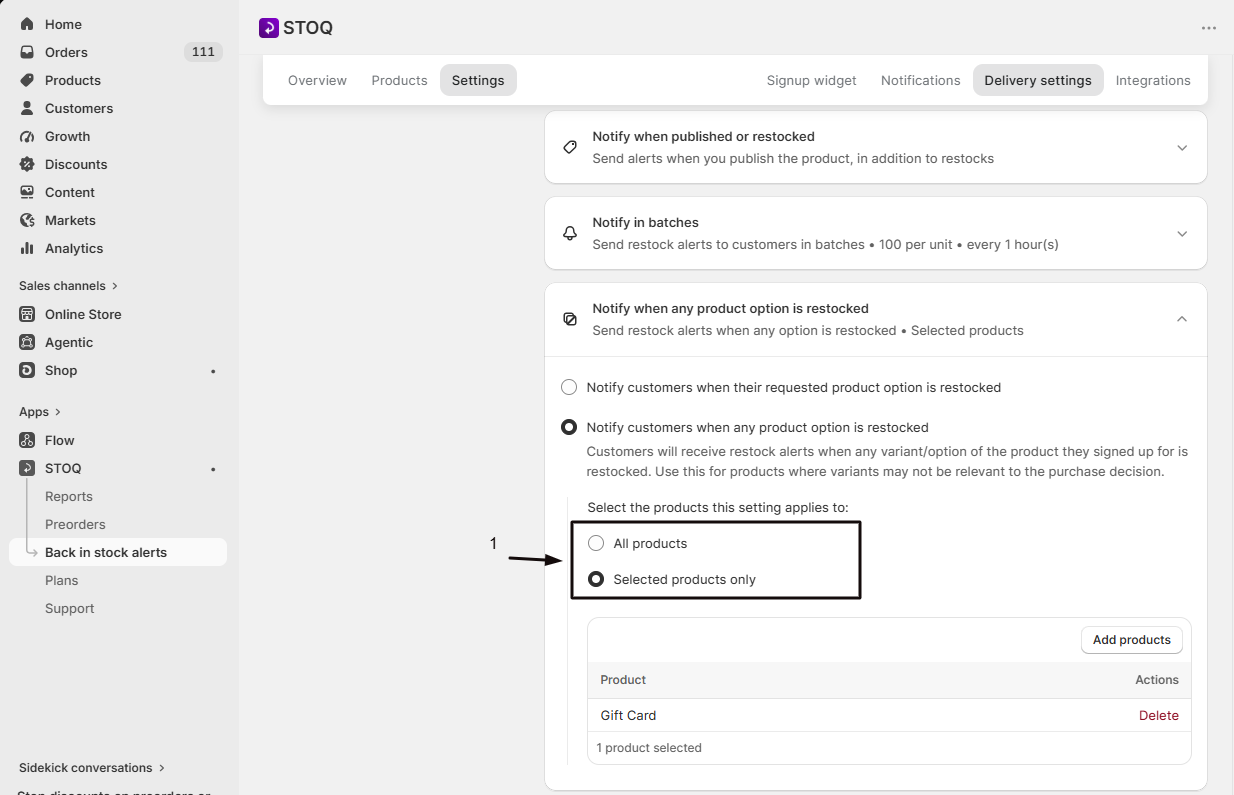
Choose which products it applies to
Pick All products or Selected products only. If you choose Selected products only, a product picker appears: pick the specific products you want covered.
-
Save
Save your delivery settings from the Delivery settings page.
Check your setup
Section titled “Check your setup”Reopen Back in stock alerts → Settings → Delivery settings and confirm the card shows Notify when any product option is restocked turned on, with your chosen product scope, All products or your selected list. If you chose Selected products only, confirm the products you want covered are in the list. The setting takes effect on the next restock: a waiting signup on a covered product should get an alert when any variant of that product comes back in stock, not just the exact variant they picked.
Troubleshooting
Section titled “Troubleshooting”A customer signed up for one variant but got notified when a different variant restocked
That’s expected. If the product they signed up for is covered by any-variant notifications, either under All products or in your Selected products list, a restock of any variant notifies all of that product’s waiting signups, regardless of which variant they originally picked.
A variant restocks but no alert sends
Check these settings, which still apply on top of any-variant matching:
Any-variant matching isn't working for a product added after setting up Selected products only
Products added later aren’t automatically included in an existing list. Open the any-variant settings and add the new product, or switch to All products to cover new products automatically.
Is any-variant matching on by default?
No. By default STOQ only notifies a signup when the exact variant they requested restocks. You have to turn on any-variant notifications and choose a product scope.
Can I turn this on for only some products?
Yes. Choose Selected products only in the product scope and pick the products from the list. Any product not on that list keeps the default exact-variant behavior.
Why is the 'any product option' choice greyed out?
It requires a paid plan. On a free plan the option is disabled and shows an Upgrade link: upgrading unlocks it.
Does turning this on affect signups that already exist?
Yes. The setting is evaluated on the product at the time of a restock, not on when the customer signed up, so it also applies to signups that were already waiting when you turned it on.
Does this affect which variant is shown or linked in the alert?
No. This setting only changes when an alert is triggered, not the alert’s content or which product/variant link it points to.
Related guides
Section titled “Related guides”Thanks for letting us know.
Still stuck? Ask Quinn or chat with support