Send SMS alerts through Klaviyo
Send back in stock and preorder SMS through your Klaviyo flows instead of STOQ's built-in SMS.
Last updated
Instead of STOQ’s built-in SMS, you can send your back in stock and preorder texts through Klaviyo. STOQ fires a metric for each SMS event, and your Klaviyo flow sends the message. This works for back in stock alerts, back in stock reminders, and preorder confirmations.
Before you begin
Section titled “Before you begin”| Requirement | Detail |
|---|---|
| A paid plan | Sending through Klaviyo is a paid feature, not available on the free plan. |
| Klaviyo SMS enabled | Your Klaviyo account must have SMS turned on. |
| OAuth with flow permissions | Automatic setup needs a Klaviyo connection with flows:read and flows:write scopes. |
Switch the SMS provider to Klaviyo
Section titled “Switch the SMS provider to Klaviyo”-
Open the SMS provider panel
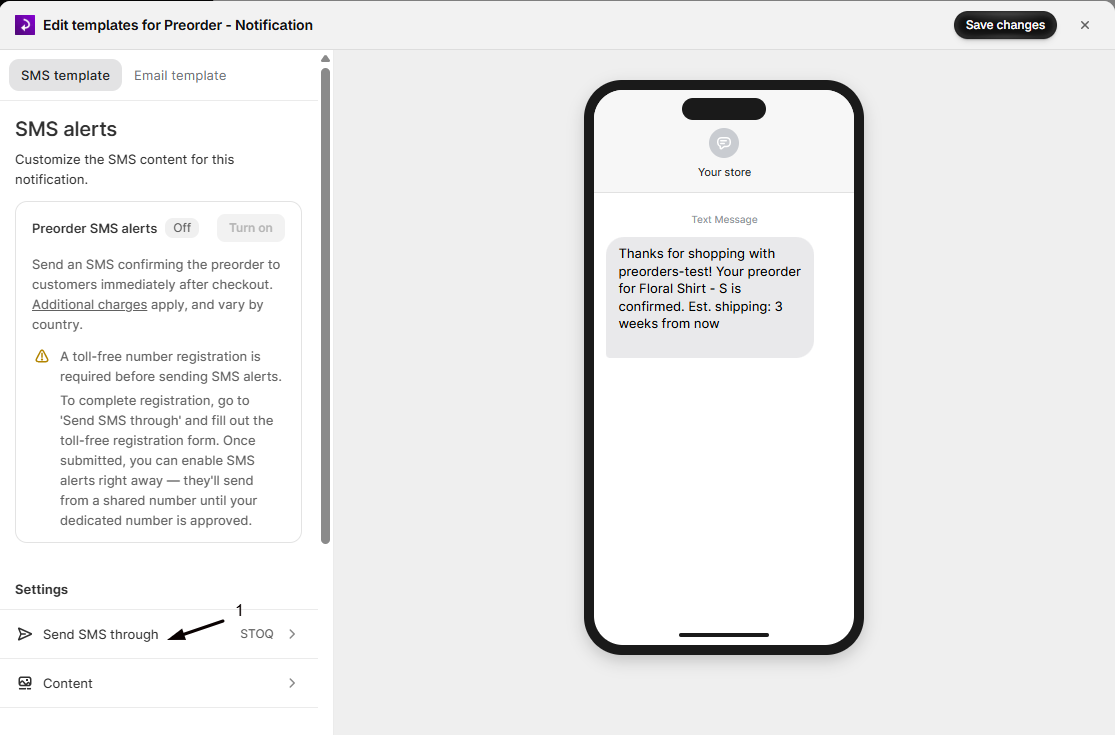
For back in stock: in the left menu bar click Back in stock alerts, open Settings > Notifications, click Customize SMS, then click Send SMS through in the sidebar.
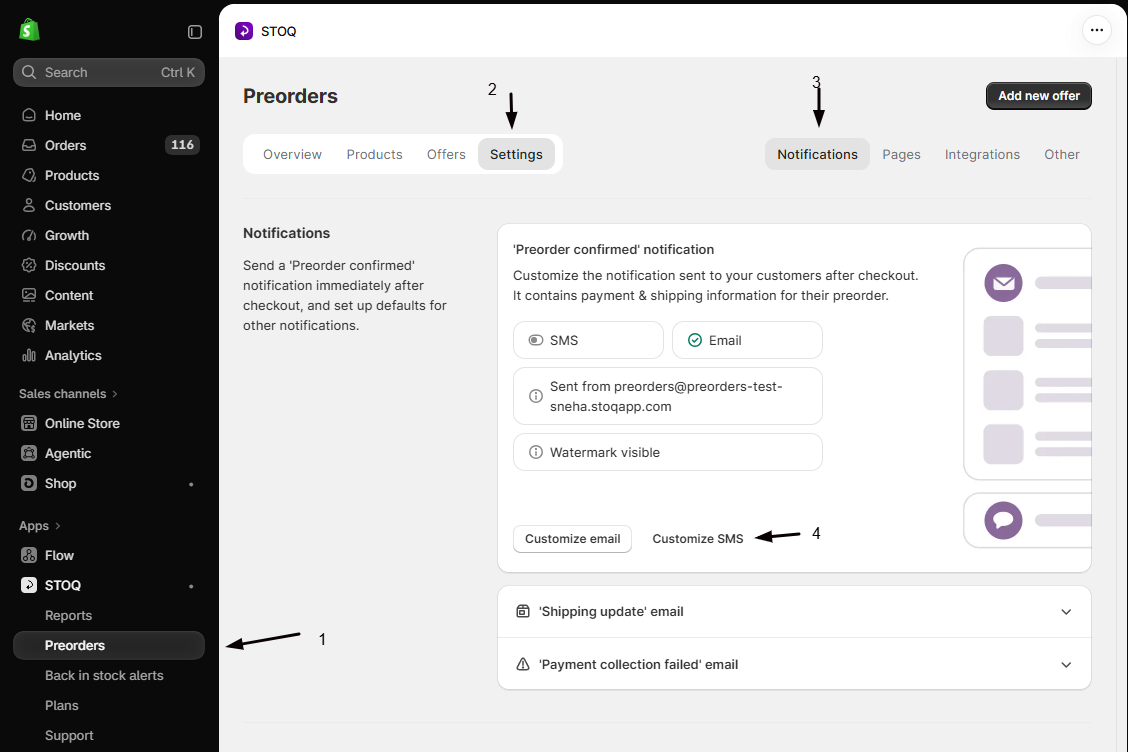
For preorders: click Preorders, open Settings > Notifications, click Customize SMS, then click Send SMS through in the sidebar.
-
Choose Klaviyo and connect
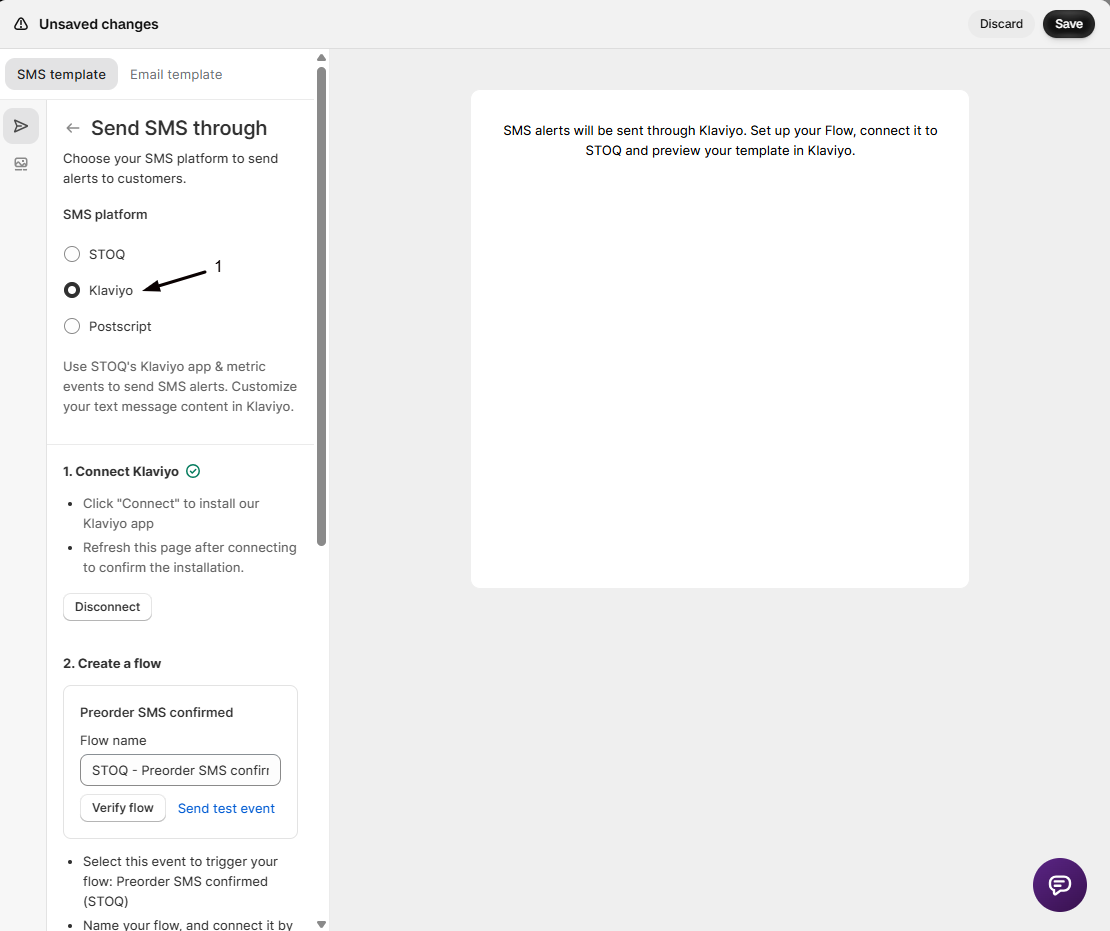
Select Klaviyo as the SMS platform and click Connect. Authorize STOQ on the Klaviyo page, then return and refresh. A green checkmark confirms the connection.
-
Set up the flows
Choose Automatic setup to have STOQ create and activate the SMS flows for you, or Manual to build them yourself. One Klaviyo connection covers both back in stock and preorder SMS, though each metric has its own flow.
-
(Manual only) Verify each flow
If you set up manually, create a flow in Klaviyo triggered by the STOQ SMS metric, add an SMS action, activate it, then enter the exact flow name in STOQ and click Verify flow.
The metrics STOQ sends
Section titled “The metrics STOQ sends”| Metric | Fires when |
|---|---|
| Back in stock SMS alert (STOQ) | A product a customer wants is restocked |
| Back in stock SMS reminder 1 (STOQ) | The restock reminder is due |
| Preorder SMS confirmed (STOQ) | A customer places a preorder |
Variables for the SMS text
Section titled “Variables for the SMS text”Compose the message in the Klaviyo flow’s SMS action using event properties. Back in stock texts have {{ event.product_title }}, {{ event.purchase_link }}, {{ event.customer_name }}, and more (see back in stock variables). Preorder texts have {{ event.first_product }}, {{ event.order_name }}, {{ event.shipping_timeline }}, and more (see preorder variables).
Check your setup
Section titled “Check your setup”For back in stock, sign up with your phone number and restock the product. For preorders, place a test preorder. Confirm the metric appears in Klaviyo and the SMS arrives on your phone.
Reset the setup
Section titled “Reset the setup”At the bottom of the Send SMS through panel, click Reset setup to switch setup methods. Resetting clears the verification status in STOQ but does not delete the flows in Klaviyo.
Troubleshooting
Section titled “Troubleshooting”The Klaviyo option is greyed out
Sending through Klaviyo requires a paid STOQ plan. Upgrade to enable it.
Automatic setup isn't available
Your Klaviyo connection is missing flow permissions. Reconnect Klaviyo so it includes flows:read and flows:write.
Flow verification fails
The flow name in STOQ must match the flow in Klaviyo exactly, including capitalization. Copy it straight from Klaviyo.
The test event reached Klaviyo but no SMS arrived
The flow may be in draft, SMS may be off for that flow, or Klaviyo’s quiet hours may be holding it. Set the flow live and check its send settings.
Can I use Klaviyo for SMS but STOQ for email?
Yes. The SMS and email providers are set separately, so you can mix them.
Who bills for the SMS?
Klaviyo. When SMS routes through Klaviyo, Klaviyo handles delivery and charges.
Do I need separate connections for back in stock and preorder?
No. One Klaviyo connection covers both. The flows are still configured per metric.
Related guides
Section titled “Related guides”Thanks for letting us know.
Still stuck? Ask Quinn or chat with support