How STOQ attributes recovered sales
How STOQ decides which orders came from a back in stock alert, and what counts toward Sales recovered.
Last updated
STOQ credits orders that came from a back in stock alert to your Sales recovered metric. It decides attribution using a few methods, checked in priority order, with no cookies or tracking pixels, only UTM links and Shopify’s Customer Journey data.
How an order gets attributed
Section titled “How an order gets attributed”STOQ checks these in order and uses the strongest match:
- Landing site UTM (high confidence): the customer clicked your alert link, so the order’s landing URL carries STOQ’s UTM parameters (
utm_source=restockrocket). - Customer Journey UTM (high confidence): Shopify’s Customer Journey records a visit with STOQ’s UTM parameters somewhere in the order’s path.
- Sent-notification match (medium or low confidence): the customer’s email or phone matches a notification for an ordered variant. Medium if the alert was sent within 2 days before the order, low if more than 2 days before.
The UTM parameters on alert links
Section titled “The UTM parameters on alert links”| Parameter | Value |
|---|---|
utm_source |
restockrocket |
utm_medium |
email or sms |
utm_campaign |
notification |
utm_term |
the message ID |
What counts toward Sales recovered
Section titled “What counts toward Sales recovered”Counts (high or medium confidence, order not cancelled):
- Customer clicks the alert link and buys, even if they buy a different product.
- Customer gets the alert, doesn’t click, but buys within 2 days.
Doesn’t count:
- Purchase more than 2 days after the alert with no click (tracked as low confidence, excluded).
- The ordered product was never in an alert.
- The attributed order was cancelled (removed from the total).
See it in Reports
Section titled “See it in Reports”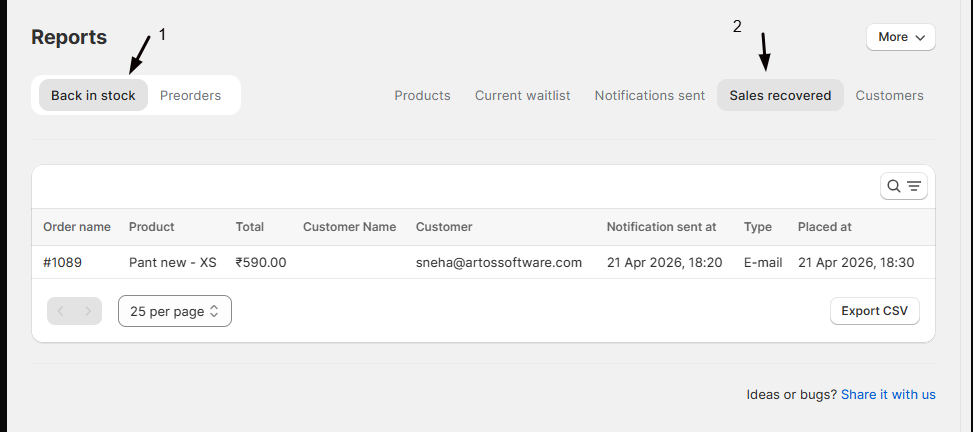
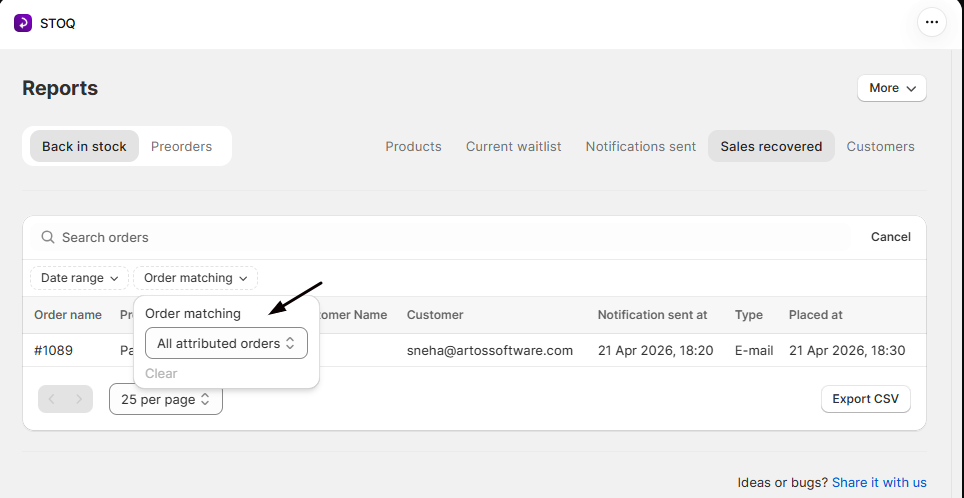
In the STOQ app’s left menu, click Reports, open the Back in stock tab, then the Sales recovered tab. It lists attributed orders with the alert type (email or SMS) and send date. You can view all attributed orders or filter to an exact variant match only.
How preorder orders are counted
Section titled “How preorder orders are counted”Preorder orders aren’t attributed by UTM links. STOQ counts an order as a preorder when one of its line items carries a STOQ purchase option: the Shopify selling plan STOQ attaches, or STOQ’s own tracking on the line. It’s the purchase option on the line that counts, not how or where the order was placed:
- An order placed through the storefront Preorder button counts.
- An order you create in Shopify admin, or as a draft order, counts too, as long as a line uses the STOQ purchase option.
- A POS preorder counts: Shopify POS can’t use the selling plan, so STOQ’s tile adds its own tracking to the line instead.
An order with none of that on its lines isn’t counted as a preorder and won’t show in the Preorders reports, even if the product is in a preorder offer. (Some stores are also set up to count a plain checkout of a product that’s in an active offer, without the purchase option on the line; this is off by default.) Preorder orders appear in Reports > Preorders, not in Sales recovered.
Does STOQ use cookies or pixels?
No. Attribution uses UTM parameters and Shopify’s Customer Journey only.
Can I see which alert led to an order?
Yes. Reports > Back in stock > Sales recovered shows the notification type and send date for each attributed order.
Can I change the UTM parameters?
No. They’re set automatically so attribution stays consistent.
Related guides
Section titled “Related guides”Thanks for letting us know.
Still stuck? Ask Quinn or chat with support