Preorders on Google, YouTube, Instagram, and Facebook
How STOQ preorders behave on the Google & YouTube and Facebook & Instagram sales channels, and how to avoid selling preorder products without preorder context.
Last updated
Use this guide if you sell through Shopify’s Google & YouTube or Facebook & Instagram sales channels and also run STOQ preorders. Whether a preorder works on these channels comes down to one thing: where the buyer completes checkout. The preorder button and its payment options never appear on the channel surface itself, so what matters is whether the channel sends the buyer to your Online Store to pay, or uses its own checkout.
Why the preorder widget doesn’t show on these channels
Section titled “Why the preorder widget doesn’t show on these channels”STOQ adds the preorder button, badge, disclaimer, payment options, countdown, and progress bar through a theme app extension that runs only on your Online Store (and custom storefronts built on it). The Google, YouTube, Instagram, and Facebook channels render your products on their own surfaces, where that extension doesn’t run, so none of the STOQ preorder elements appear there.
Preorders also rely on Shopify selling plans (the deferred or partial-payment purchase option). Channel checkouts that aren’t your Online Store don’t support selling plans, so a preorder can’t be created through them. This is the same platform limitation that stops preorders working in the Shop app.
What decides whether a preorder happens
Section titled “What decides whether a preorder happens”It depends entirely on where the buyer checks out:
- If the channel sends buyers to your Online Store to complete the purchase, the order goes through as a preorder, whether or not the Shopify purchase option (selling plan) is enabled, exactly like any other Online Store order.
- If the channel uses its own checkout, separate from your store, the preorder context doesn’t apply. The buyer sees the regular Shopify price with no preorder button, deposit, or partial payment, and can place a normal order at full price.
How checkout works is set per channel in your Shopify admin, so check each channel’s settings to confirm which applies to your store.
Channel support at a glance
Section titled “Channel support at a glance”| Channel | Preorders |
|---|---|
| Online Store | Yes |
| Custom Storefront | Yes |
| Google & YouTube | Only if the channel sends buyers to your Online Store to check out |
| Facebook & Instagram | Only if the channel sends buyers to your Online Store to check out |
| Shop app | No, see Do STOQ preorders work with the Shop app? |
| Shopify POS | Through STOQ’s POS integration, see Preorders on Shopify POS |
What customers see on the channel
Section titled “What customers see on the channel”On the channel listing itself, a preorder product looks like a normal product:
- No preorder button or “Notify me” button, just the channel’s standard buy or checkout action.
- The regular Shopify price, not your preorder discount. Preorder discounts and deposits are applied through STOQ on the Online Store, so they don’t show on the channel.
- No preorder disclaimer or shipping timeline.
If that channel uses its own checkout, an order placed there is a normal order: it won’t carry your preorder tag, deposit or partial payment, or fulfillment hold.
Find affected products in STOQ
Section titled “Find affected products in STOQ”STOQ checks the products in each offer and flags any variant that is also published to a sales channel other than the Online Store and Point of Sale, such as Shop, Facebook & Instagram, or Google & YouTube. The check follows Shopify’s per-variant publishing, so a variant you already removed from a channel isn’t flagged, and products with no channel issue show no icon.
When you pick specific products to add to an offer, STOQ runs the same check first and lets you add the flagged products anyway or leave them out. See Add products to an offer.
The flag doesn’t check how a channel handles checkout. If a flagged channel sends buyers to your Online Store to check out, preorders still go through there, so you can leave that channel as it is.
STOQ also checks this before you add products. When you choose products for an offer with Add products, the add-products check lists any that are also on other channels, for example “2 products are also on Shop”. Click Change on that row to see which products, then choose Add them anyway or Don’t add these N. See Add products to an offer. Products you add anyway, or add another way, still get the orange icon below.
-
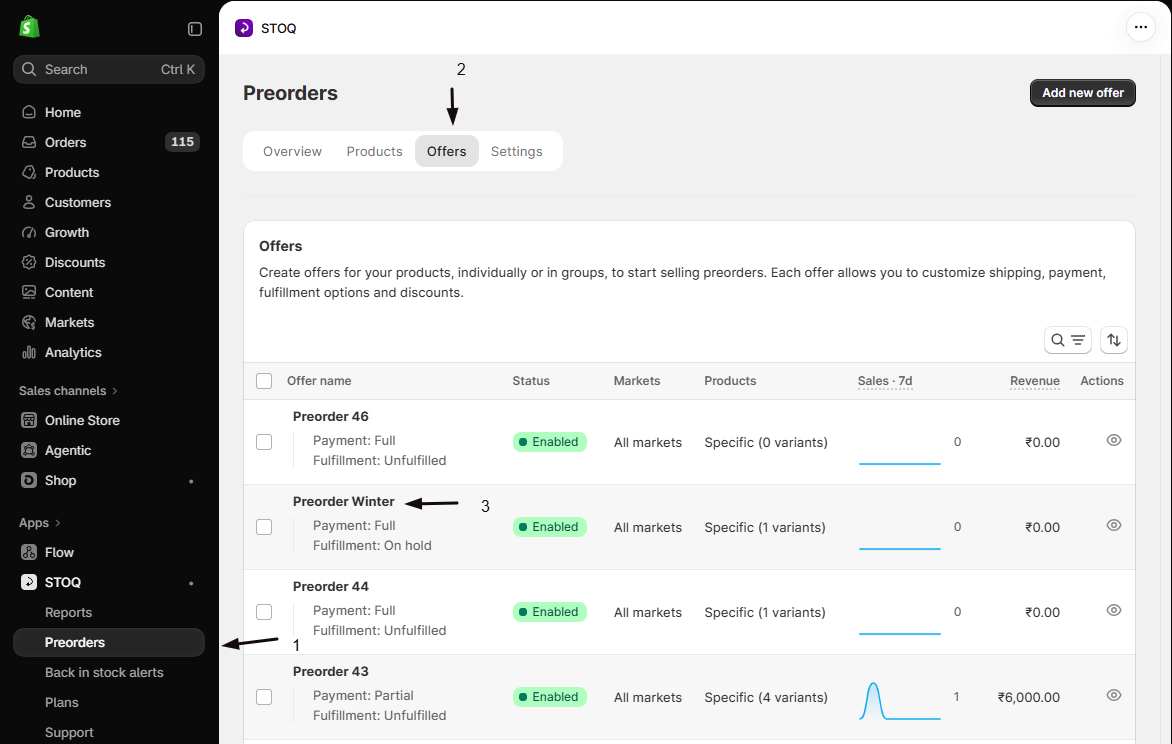
Open the offer
- In the left menu of the STOQ app, click Preorders.
- Click the Offers tab at the top.
- Click the offer in the list to open it. It opens on the Overview tab.
-
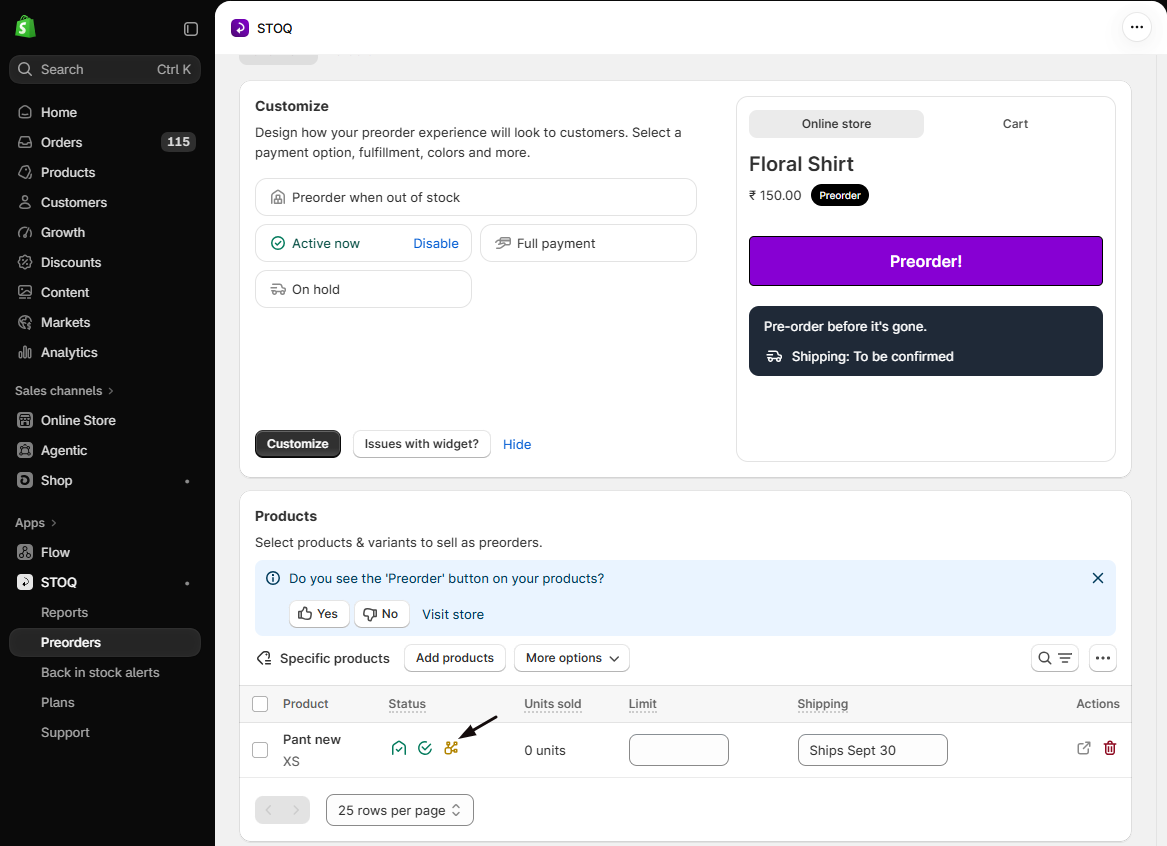
Find the flagged variants
Scroll down to the offer’s Products section. In the Status column, look for the orange sales channel icon next to the variant’s status. Hover over it to see which unsupported channels the variant is published on.
-
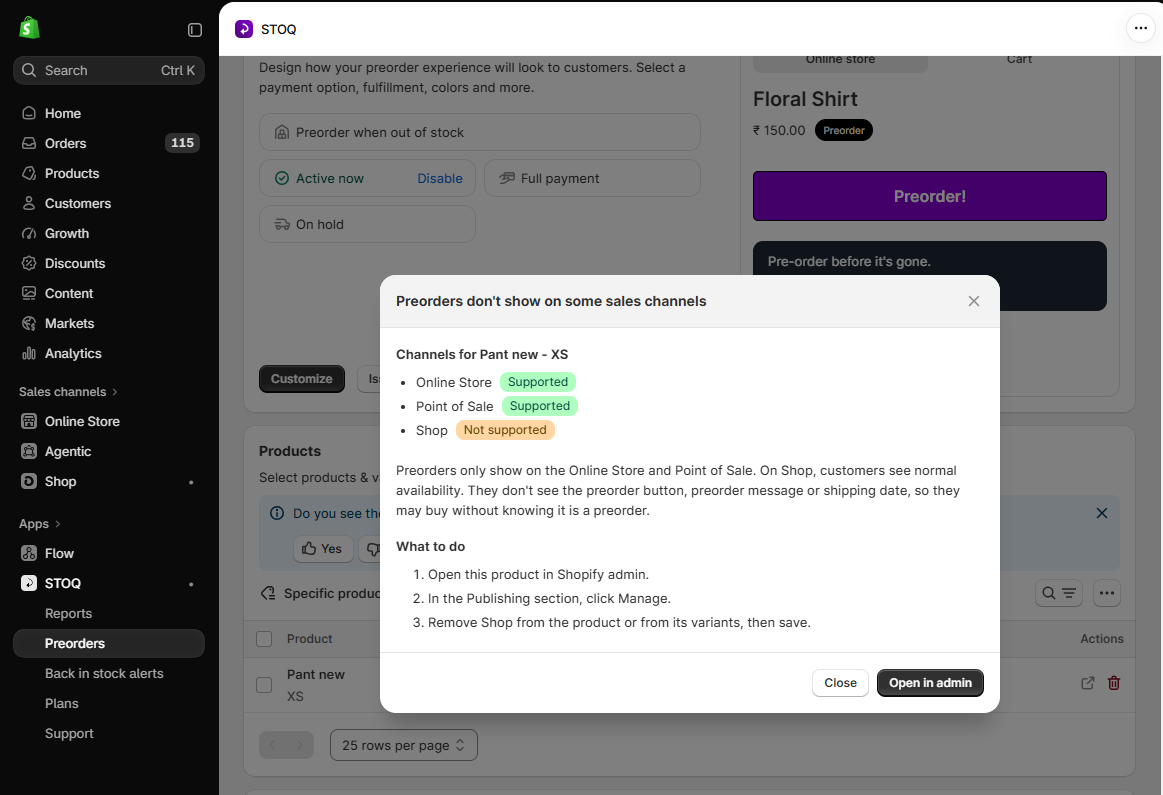
Open the details
Click the icon to open Preorders don’t show on some sales channels. It lists every channel the variant is on, each marked Supported or Not supported, followed by the steps to fix it under What to do.
-
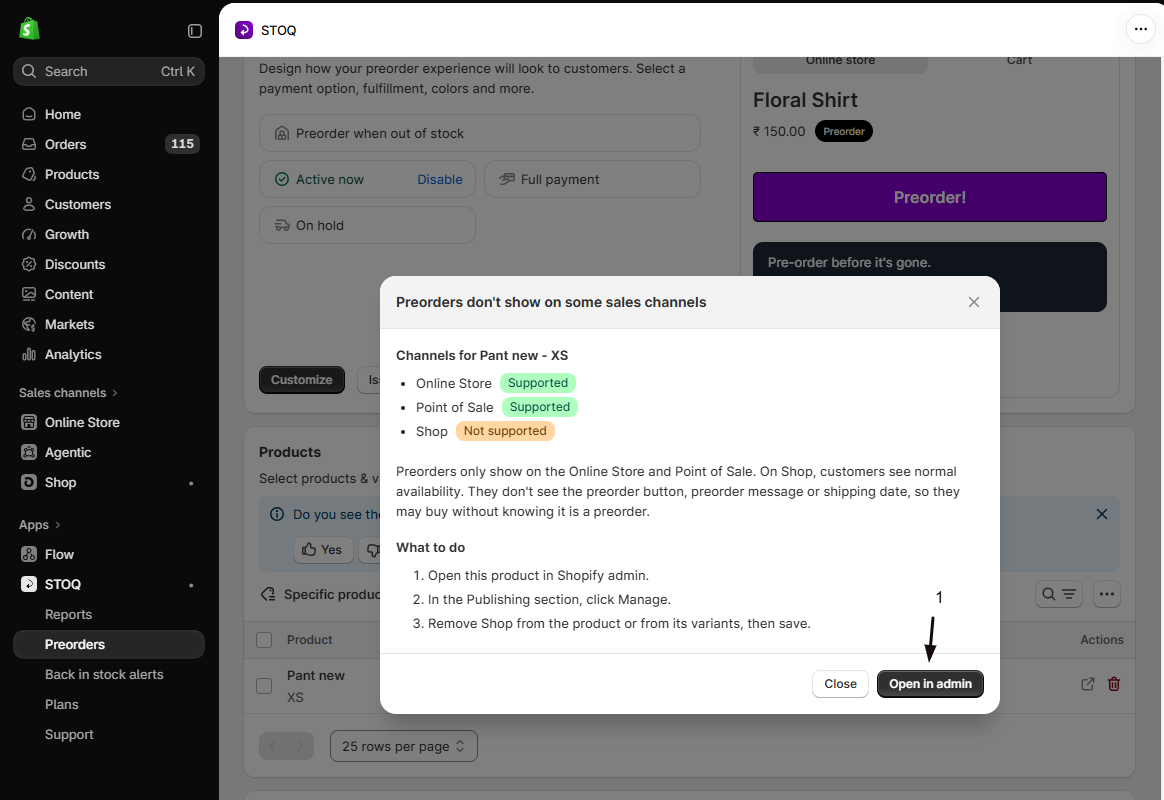
Change publishing in Shopify
Click Open in admin to open the product, or the specific variant, in Shopify admin in a new tab. In the Publishing section, click Manage, remove the unsupported channels from the product or from its variants, then save.
If you set Group by to Product, the icon on a product row opens a list of Variants on unsupported channels, showing each affected variant and the channels it’s on. On smaller screens, tap the edit (pencil) button on the row to expand it, then tap Sales channel issue under View product.
STOQ only links out to Shopify admin. It doesn’t change a product’s channels for you.
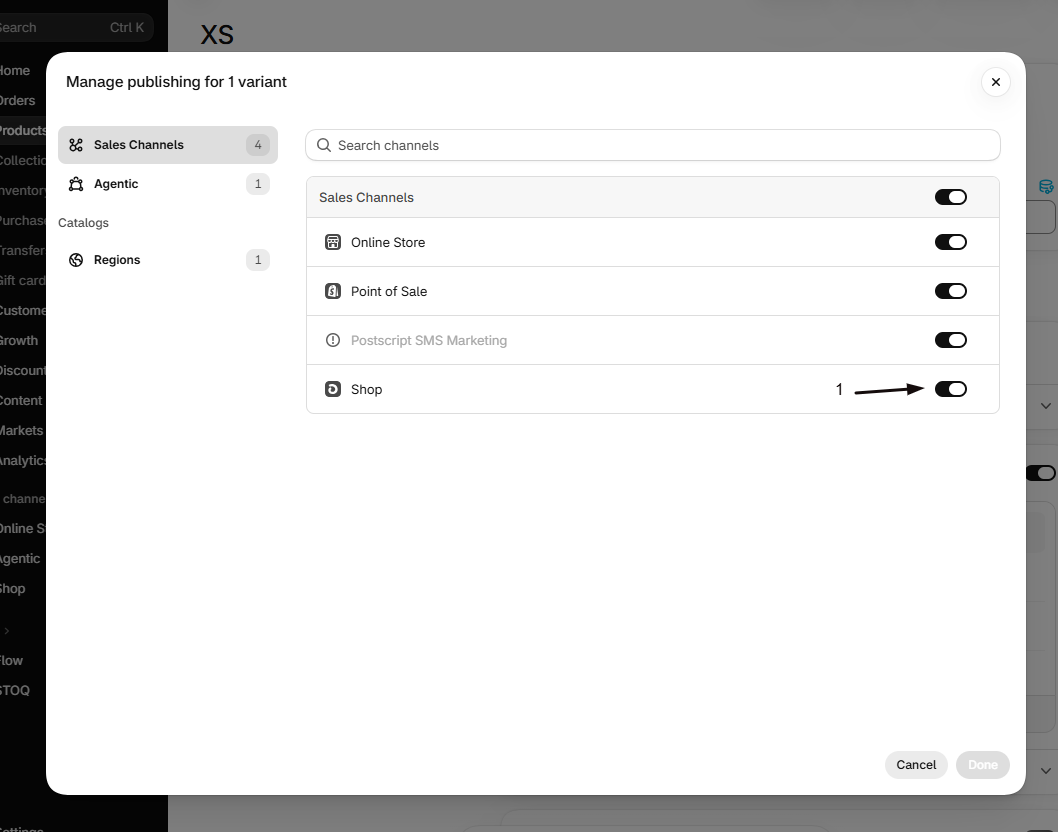
Keep preorder products out of channels that use their own checkout
Section titled “Keep preorder products out of channels that use their own checkout”If a channel checks out on its own surface and you don’t want preorder products sold there without preorder context, remove those products from that channel while the campaign runs.
-
Open the product’s publishing settings
In Shopify admin, open the preorder product and find the Publishing section.
-
Remove the channel
Uncheck the Google & YouTube or Facebook & Instagram channel and save. To do many at once, select the products in your product list, use bulk edit, and exclude the channel.
When the preorder campaign ends and the product sells normally again (no selling plan), you can re-add it to the channel the same way.
Why doesn't the preorder button show on my Instagram or Facebook shop?
STOQ’s preorder button is part of a theme app extension that only runs on your Online Store. The Instagram and Facebook surfaces render products themselves, so the button, disclaimer, and payment options don’t appear there.
Can customers still buy a sold-out preorder product from these channels?
Only if the channel routes checkout to your Online Store, where the preorder purchase option applies. If the channel uses its own checkout, a sold-out product either can’t be bought or is sold as a normal order without preorder terms, depending on its inventory settings.
Will my preorder discount or deposit apply to a channel sale?
Not on a channel that uses its own checkout. Preorder discounts and deposits are applied by STOQ through the Online Store, so a sale completed on the channel’s own checkout is charged the regular full price with no deposit.
How do I know whether a channel uses its own checkout or my Online Store?
It’s configured per channel in your Shopify admin. Open the channel’s settings and check how checkout is handled, or place a test purchase and see whether it sends you to your store’s checkout.
Does removing a product from a channel affect its Online Store preorders?
No. Channel publishing is separate from your Online Store. Removing a product from Google & YouTube or Facebook & Instagram only stops it showing on that channel; its Online Store preorder offer is unaffected.
Why is there an orange icon next to a product in my offer?
The variant is also published to a sales channel where the preorder widget doesn’t show, such as Shop, Facebook & Instagram, or Google & YouTube. Its Online Store preorders still work. Hover over the icon to see the channels, or click it for the full list and how to fix it. See Find affected products in STOQ.
I removed the channel in Shopify but the icon is still showing. Why?
Reload the offer page, because the check runs each time the products load. A variant is only sold on a channel when both the product and the variant are published there. If the icon stays after a reload, reopen Publishing in Shopify admin and confirm the channel change was saved.
STOQ warned me about sales channels when I added products. What happens if I add them anyway?
They’re added and take preorders on your Online Store and POS. On the other channels they sell as normal products with no preorder details. The warning is advice only: STOQ doesn’t change where your products are published.
A customer came from a Facebook link but the order wasn't a preorder. Why?
A preorder’s terms (the selling plan) are attached when the item is added to cart from the product page. A link that sends the buyer straight to checkout, or a channel’s own checkout, skips that step, so the order is placed at full price with no preorder. Check whether your Facebook link opens the product page on your Online Store, where the buyer can add it as a preorder, rather than a cart or checkout link. On your Online Store, STOQ also blocks express and wallet checkout (Shop Pay, Buy Now, Apple Pay, Google Pay) on preorder items and prompts the buyer to use the preorder button, though it can’t intercept PayPal and other cross-origin wallets.
Related guides
Section titled “Related guides”Thanks for letting us know.
Still stuck? Ask Quinn or chat with support