
Plans and billing
Every STOQ plan includes a monthly preorder limit: the number of orders containing preorder products you can sell each calendar month. Stay within the limit and no additional charges apply beyond the plan subscription fee. Exceed the limit on a paid plan and STOQ keeps processing preorders and bills a small per-order fee for each order above the limit. On the Free plan, preorders are paused after a short grace period instead.
Plans at a glance
| Free | Lite | Pro | Unlimited | |
|---|---|---|---|---|
| Monthly preorder limit | 10 orders | 100 orders | 400 orders | No limit |
| Fee per order above limit | N/A (pauses instead) | Per-order overage fee | Per-order overage fee | N/A |
| Transaction fees | 0% | 0% | 0% | 0% |
| Free trial | N/A | 14 days | 14 days | 14 days |
For current subscription prices and the exact per-order overage fee for each plan, go to Plans in the STOQ sidebar: the pricing cards always show live figures.
A "preorder" for billing purposes is one order containing at least one preorder product, not one line item, so an order with three preorder products still counts as one preorder.
How billing works by plan type
Free plan
You can sell up to 10 preorder orders per month at no cost. Once you reach the limit:
- STOQ records the limit-reached timestamp on your store and sends you a limit-reached email.
- An in-app banner appears on your Preorders pages: "You've reached the preorder limit on your free plan. Upgrade your plan within the next 24 hours, or your preorder offers will be disabled."
- If you don't upgrade within approximately 24 hours, STOQ disables all your preorder offers.
- Your offers remain disabled until you upgrade to a paid plan or your monthly limit resets at the start of the next calendar month.
No overage fee is ever charged on the Free plan, preorders simply stop rather than continuing.
Paid plans (Lite and Pro)
STOQ continues processing preorder orders even after you exceed your monthly limit. For each order above the limit, a per-order overage fee is charged. The fee is a fixed amount per order regardless of the order value; it's only charged when the order contains a preorder product powered by STOQ.
Overage fees are billed as Shopify usage charges and appear on your regular Shopify invoice alongside your STOQ subscription.
If you consistently pay overage fees, upgrading to the next plan tier is usually cheaper than paying per-order charges each month.
Unlimited plan
The Unlimited plan has no preorder limit and no per-order overage fee. You can sell as many preorder orders as you need each month without additional charges.
Track your usage and notifications
To check where you stand against your limit:
- In STOQ, click Plans in the sidebar.
- The Usage card at the top of the page shows your preorder count against your plan limit for the current month, displayed as a progress bar.
- Use the month picker to review up to six months of historical usage.
STOQ also emails your store admin address at key usage milestones, so you're never caught off guard:
| Threshold | What is sent |
|---|---|
| 25% of limit used | Heads-up email |
| 50% of limit used | Halfway reminder |
| 80% of limit used | Warning email, consider upgrading |
| 100% of limit reached | Limit-reached email: paid plans continue with overage fees; Free plan warns that offers will be disabled |
An in-app banner also appears on your Preorders pages whenever you're at or above 80% of your limit.
What customers will see
On a paid plan, customers notice nothing when you go over your limit: STOQ keeps processing preorders normally, and the overage fee is billed to you, not them.
On the Free plan, if you exceed the limit and don't upgrade within the grace period, STOQ disables all your preorder offers: the Preorder button stops appearing on your storefront and customers can't place new preorder orders. Orders customers already placed aren't affected.
Set it up
From Plans in the STOQ sidebar, you can upgrade your plan and, if you have one, apply a discount code before subscribing.
Open Plans
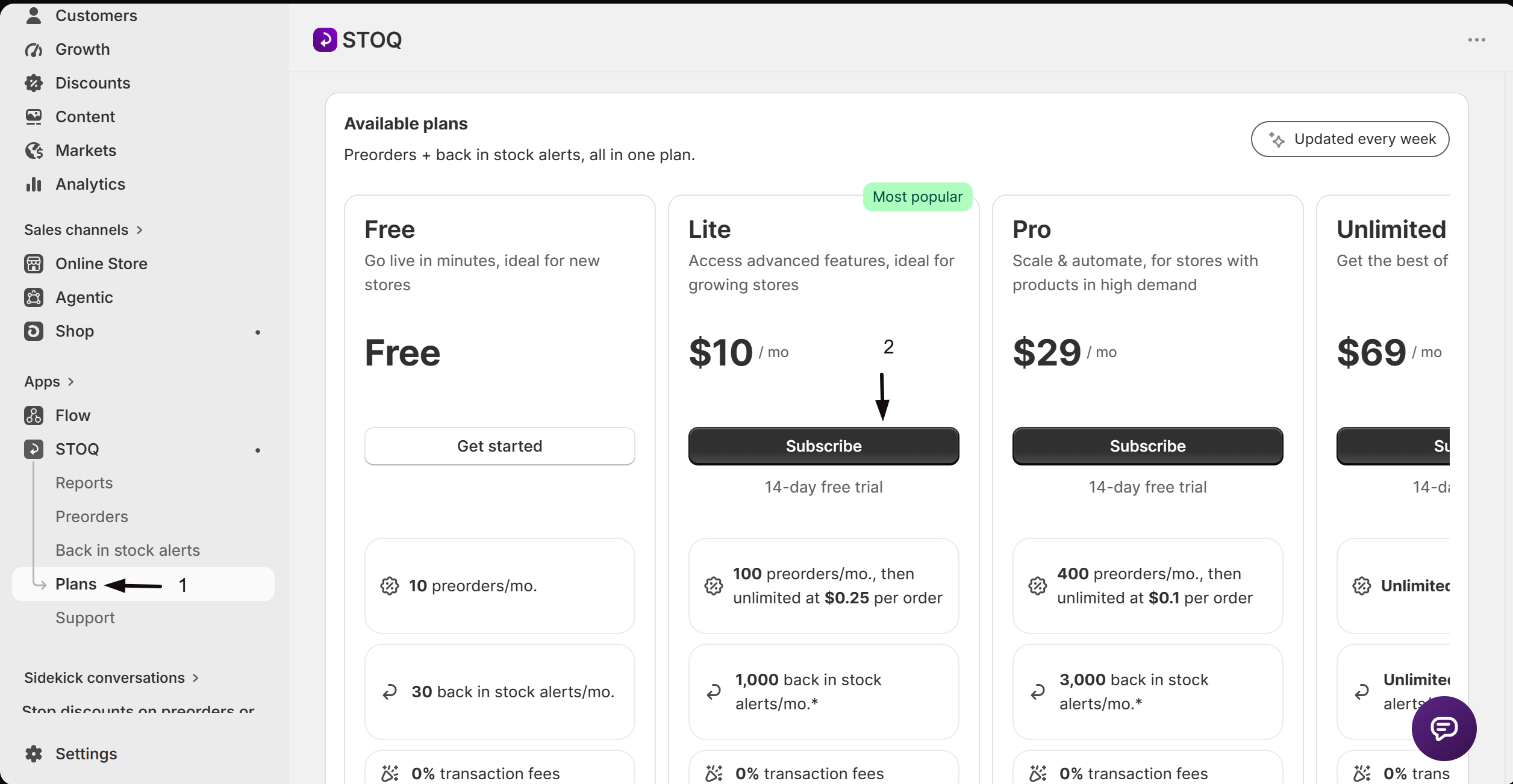
In STOQ, click Plans in the left sidebar menu.
Select a plan
Review the plan cards and click Subscribe on the plan you want. If you're on the Free plan, choosing any paid plan starts the upgrade flow.
Approve the charge in Shopify
Shopify redirects you to a confirmation screen to approve the new subscription. After you approve, you're returned to STOQ.
Re-enable your preorder offers, if they were paused
If your Free-plan preorder offers were paused for hitting the limit, a "Re-enable preorders" banner appears on the Plans page after your upgrade is confirmed.
- Click Go to Preorders to open the Preorders page.
- On the Offers tab, click Enable next to each offer that was paused.
Apply a discount code
Open the discount modal
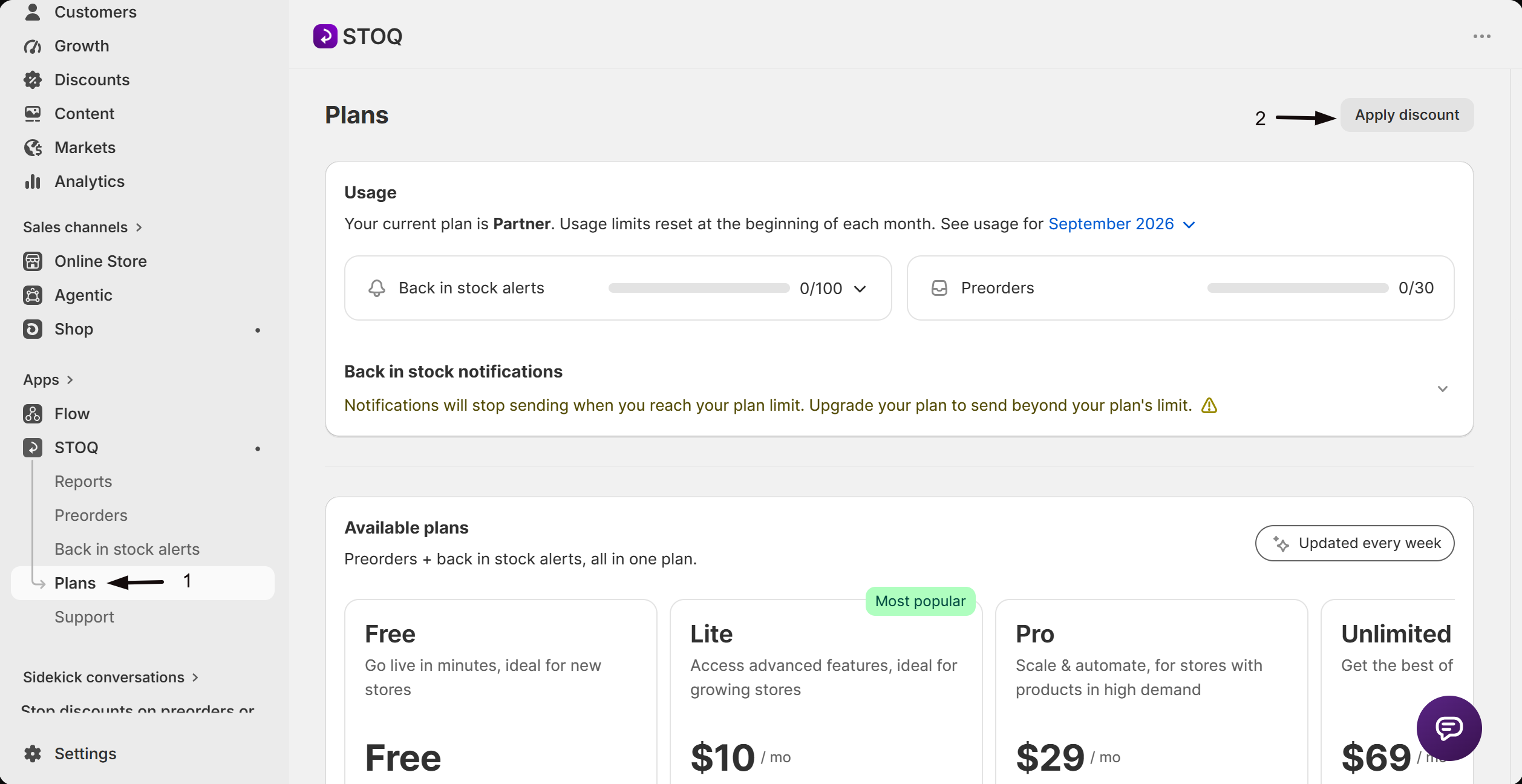
On the Plans page, click Apply discount in the top-right corner of the page header.
Enter and apply your code
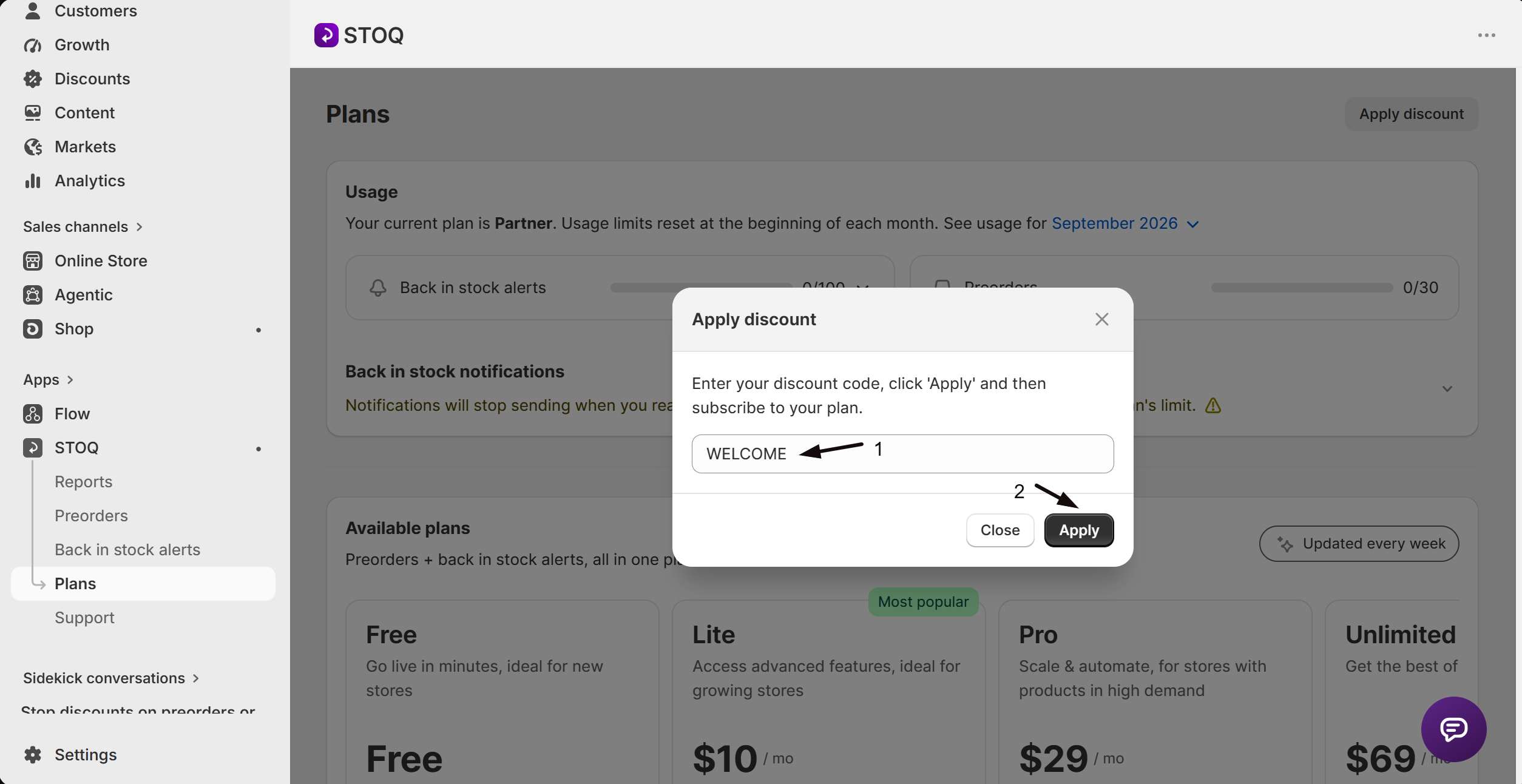
- Type your discount code in the field.
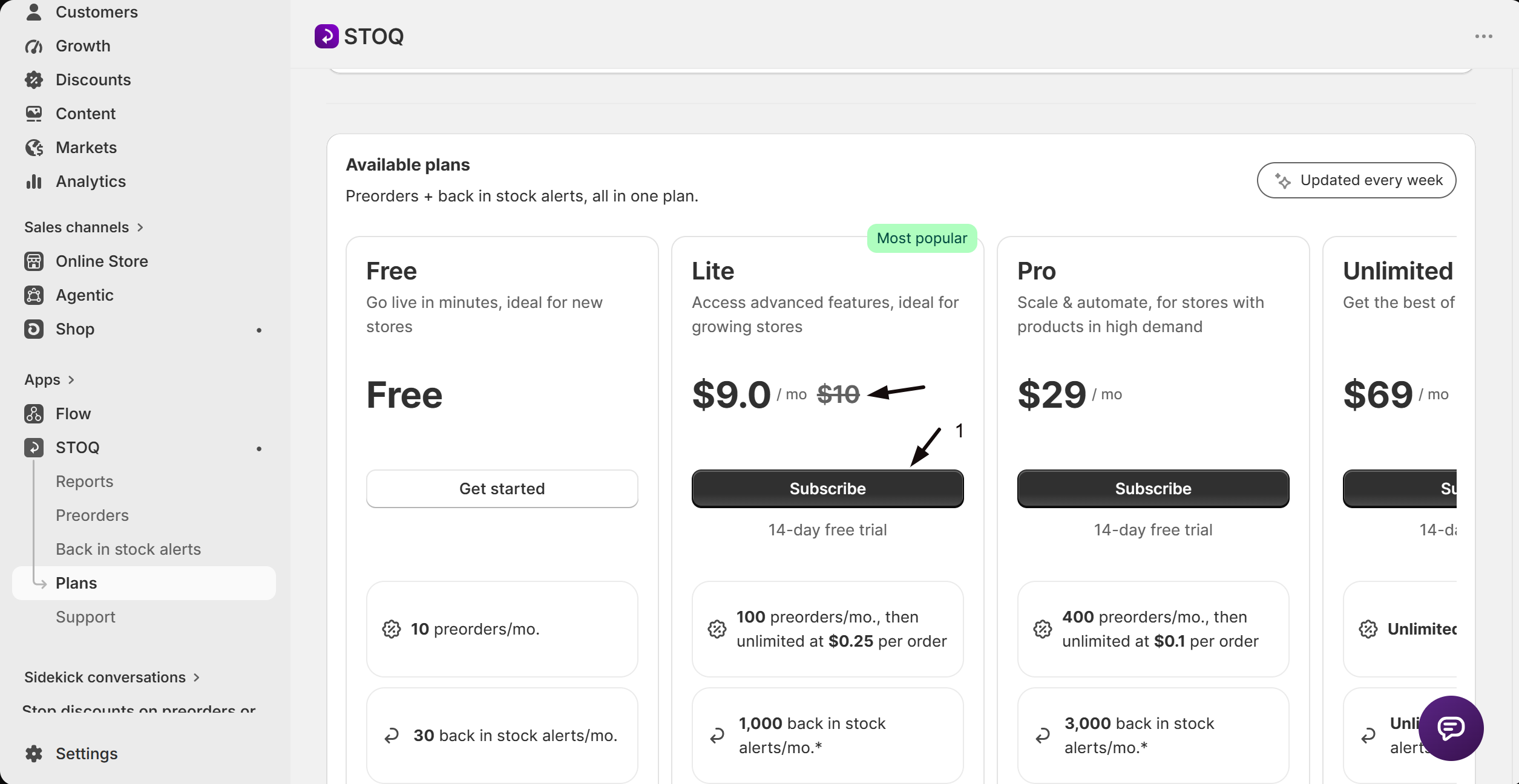
- Click Apply (a confirmation message appears and the plan cards update to show discounted prices).
Subscribe at the discounted rate
Click Subscribe on the plan you want. The discounted price is applied to the Shopify charge automatically.
Check your setup
After you upgrade, refresh Plans and confirm the new plan name, limit, and price show at the top of the page. If you had preorder offers paused from hitting the Free plan limit, use the Re-enable preorders banner's Go to Preorders link (or open Preorders → Offers directly) and click Enable on each offer that still shows as disabled, so the Preorder button reappears on your storefront.
Troubleshooting
The Preorder button disappeared from your storefront
You're most likely on the Free plan and exceeded the 10-order monthly limit. After the roughly 24-hour grace period, STOQ disables all preorder offers, which removes the button. Upgrade to a paid plan, or wait until your limit resets at the start of the next calendar month, then re-enable your offers under Preorders -> Offers.
You upgraded but your preorder offers are still disabled
Upgrading removes the plan-limit restriction on your store, but doesn't automatically turn paused offers back on. Open Preorders -> Offers and enable each offer that still shows as disabled.
You can't enable a preorder offer, including in bulk
Your store has exceeded its plan's preorder limit while on the Free plan or another plan without overage billing. STOQ blocks enabling until you upgrade; the error reads "cannot be enabled because the preorder plan limit has been reached. Please upgrade your plan to continue."
A discount code doesn't change the price
The code may be invalid, expired, already applied to your account, or not applicable to the plan you selected. Check the code and try again. If the issue persists, contact support via the chat icon in STOQ.
FAQ
Does the 14-day free trial mean I won't be charged anything?
The trial waives the monthly subscription fee for 14 days, but usage-based fees can still apply: on Lite and Pro, preorder overage fees may be charged if you exceed your included preorder limit. Unlimited has no preorder limit or overage fee.
Can I get the free trial again if I switch to a different paid plan?
No. The 14-day trial applies once across all paid plans. If you've already trialled a paid plan, switching to a new paid plan starts billing immediately.
Does STOQ take a percentage of my preorder revenue?
No. STOQ charges 0% transaction fees on all plans. Your only charges are the monthly subscription fee and, on Lite and Pro plans, a fixed per-order overage fee if you exceed your monthly preorder limit. You keep 100% of your preorder revenue.
What exactly counts as one preorder toward my limit?
One order that contains at least one preorder product powered by STOQ counts as one preorder, even if that order has several preorder items. If the same customer places two separate orders each containing a preorder product, that counts as two preorders. Only orders, not individual products or line items, are counted.
Where do overage fees appear on my invoice?
Overage fees are billed as Shopify usage charges. They appear on your regular Shopify invoice alongside your STOQ subscription fee, not as a separate STOQ invoice.
Can I upgrade mid-month to stop paying overage fees?
Yes. You can upgrade at any time from the Plans page and your new, higher limit takes effect immediately. Overage fees already incurred for orders above your previous plan's limit still apply, but orders placed after the upgrade, within the new limit, won't incur additional charges.
Related guides
Preorder free vs. paid features
See a full feature-by-feature breakdown of what each plan includes for preorders.
Partner & development stores
The free paid-tier plan for Shopify partner and development stores.
Getting started for new merchants
Step-by-step guide to setting up your first preorder offer.
Set up preorders
How to create and configure a preorder offer in STOQ.
Find and view your offers
Enable, disable, and bulk-manage your preorder offers.
